에어브릿지 연동
에어브릿지(Airbridge)를 사용하면 유저가 어떤 광고 채널과 캠페인을 통해 앱 설치를 하였는지 유입 경로 분석이 가능합니다. 그리고 이러한 설치 유입 경로를 플레어레인에 연동함으로써, 유입 경로별 최적의 CRM 마케팅을 수행할 수 있습니다.
연동 가능 데이터
Section titled “연동 가능 데이터”에어브릿지에서 제공하는 어트리뷰션 데이터는 다음과 같습니다. 본 가이드에서는 4개의 데이터를 연동하는 것을 서술합니다만, 데이터가 모두 수집된 상태라면 모두 연동하는 것 또한 가능합니다.
| 키 | 설명 |
|---|---|
| attributedChannel | 채널 |
| attributedCampaign | 캠페인 |
| attributedAdGroup | 광고 그룹 |
| attributedAdCreative | 광고 소재 |
| attributedContent | 콘텐츠 |
| attributedTerm | 키워드 |
| attributedSubPublisher | 하위매체 |
| attributedSubSubPublisher1 | 하하위매체 1 |
| attributedSubSubPublisher2 | 하하위매체 2 |
| attributedSubSubPublisher3 | 하하위매체 3 |
데이터 연동 방법
Section titled “데이터 연동 방법”에어브릿지 SDK를 통해 유입 경로(어트리뷰션) 데이터를 조회할 수 있으며, 그 데이터를 플레어레인의 태그로 연동합니다.
Android SDK
Section titled “Android SDK”class MainApplication : Application() { override fun onCreate() { super.onCreate()
FlareLane.initWithContext(this, "PROJECT_ID", true)
val option = AirbridgeOptionBuilder("YOUR_APP_NAME", "YOUR_APP_SDK_TOKEN") .setOnAttributionReceived(object : OnAttributionResultReceiveListener { override fun onAttributionResultReceived(result: Map<String, String>) { val tags = JSONObject() result["attributedChannel"]?.let { tags.put("attributedChannel", it) } result["attributedCampaign"]?.let { tags.put("attributedCampaign", it) } result["attributedAdGroup"]?.let { tags.put("attributedAdGroup", it) } result["attributedAdCreative"]?.let { tags.put("attributedAdCreative", it) }
if (tags.length() > 0) { FlareLane.setTags(applicationContext, tags) } } }) .build() Airbridge.initializeSDK(this, option) }}public class MainApplication extends Application { @Override public void onCreate() { super.onCreate();
FlareLane.initWithContext(this, "PROJECT_ID", true);
AirbridgeOption option = new AirbridgeOptionBuilder("YOUR_APP_NAME", "YOUR_APP_SDK_TOKEN") .setOnAttributionReceived(new OnAttributionResultReceiveListener() { @Override public void onAttributionResultReceived(@NonNull Map<String, String> result) { JSONObject tags = new JSONObject(); try { if (result.get("attributedChannel") != null) { tags.put("attributedChannel", result.get("attributedChannel")); } if (result.get("attributedCampaign") != null) { tags.put("attributedCampaign", result.get("attributedCampaign")); } if (result.get("attributedAdGroup") != null) { tags.put("attributedAdGroup", result.get("attributedAdGroup")); } if (result.get("attributedAdCreative") != null) { tags.put("attributedAdCreative", result.get("attributedAdCreative")); }
if (tags.length() > 0) { FlareLane.setTags(getApplicationContext(), tags); } } catch (JSONException e) { // Handling Exception... } } }) .build(); Airbridge.initializeSDK(this, option); }}iOS SDK
Section titled “iOS SDK”import FlareLaneimport Airbridge
@mainclass AppDelegate: UIResponder, UIApplicationDelegate {
func application(_ application: UIApplication, didFinishLaunchingWithOptions launchOptions: [UIApplication.LaunchOptionsKey: Any]?) -> Bool { FlareLane.initWithLaunchOptions(launchOptions, projectId: "PROJECT_ID", requestPermissionOnLaunch: true)
let option = AirbridgeOptionBuilder(name: "YOUR_APP_NAME", token: "YOUR_APP_SDK_TOKEN") .setOnAttributionReceived({ attribution in var tags: [String: Any] = [:]
if let attributedChannel = attribution["attributedChannel"] { tags["attributedChannel"] = attributedChannel } if let attributedCampaign = attribution["attributedCampaign"] { tags["attributedCampaign"] = attributedCampaign } if let attributedAdGroup = attribution["attributedAdGroup"] { tags["attributedAdGroup"] = attributedAdGroup } if let attributedAdCreative = attribution["attributedAdCreative"] { tags["attributedAdCreative"] = attributedAdCreative }
if !tags.isEmpty { FlareLane.setTags(tags: tags) } }) .build() Airbridge.initializeSDK(option: option)
return true }#import "AppDelegate.h"@import FlareLane;#import <Airbridge/Airbridge.h>
@implementation AppDelegate
- (BOOL)application:(UIApplication *)application didFinishLaunchingWithOptions:(NSDictionary *)launchOptions {
[FlareLane initWithLaunchOptions:launchOptions projectId:@"PROJECT_ID" requestPermissionOnLaunch:YES];
AirbridgeOptionBuilder* optionBuilder = [[AirbridgeOptionBuilder alloc] initWithName:@"YOUR_APP_NAME" token:@"YOUR_APP_SDK_TOKEN"]; [optionBuilder setOnAttributionReceived:^(NSDictionary<NSString *,NSString *> * attribution) { NSMutableDictionary *tags = [[NSMutableDictionary alloc] init];
if (attribution[@"attributedChannel"]) { [tags setObject:attribution[@"attributedChannel"] forKey:@"attributedChannel"]; } if (attribution[@"attributedCampaign"]) { [tags setObject:attribution[@"attributedCampaign"] forKey:@"attributedCampaign"]; } if (attribution[@"attributedAdGroup"]) { [tags setObject:attribution[@"attributedAdGroup"] forKey:@"attributedAdGroup"]; } if (attribution[@"attributedAdCreative"]) { [tags setObject:attribution[@"attributedAdCreative"] forKey:@"attributedAdCreative"]; }
if (tags.count > 0) { [FlareLane setTagsWithTags:tags]; } }]; AirbridgeOption* option = [optionBuilder build]; [Airbridge initializeSDKWithOption:option];
return YES;}React Native SDK
Section titled “React Native SDK”FlareLane.initialize('PROJECT_ID');
Airbridge.setOnAttributionReceived(attribution => { const tags: {[key: string]: string} = {};
if (attribution.attributedChannel) { tags.attributedChannel = attribution.attributedChannel; } if (attribution.attributedCampaign) { tags.attributedCampaign = attribution.attributedCampaign; } if (attribution.attributedAdGroup) { tags.attributedAdGroup = attribution.attributedAdGroup; } if (attribution.attributedAdCreative) { tags.attributedAdCreative = attribution.attributedAdCreative; }
if (Object.keys(tags).length > 0) { FlareLane.setTags(tags); }});Flutter SDK
Section titled “Flutter SDK”FlareLane.shared.initialize("PROJECT_ID", requestPermissionOnLaunch: true);
Airbridge.setOnAttributionReceived((result) { Map<String, String> tags = {};
if (result['attributedChannel'] != null) { tags['attributedChannel'] = result['attributedChannel']!; } if (result['attributedCampaign'] != null) { tags['attributedCampaign'] = result['attributedCampaign']!; } if (result['attributedAdGroup'] != null) { tags['attributedAdGroup'] = result['attributedAdGroup']!; } if (result['attributedAdCreative'] != null) { tags['attributedAdCreative'] = result['attributedAdCreative']!; }
if (tags.isNotEmpty) { FlareLane.shared.setTags(tags); }});연동된 데이터 조회
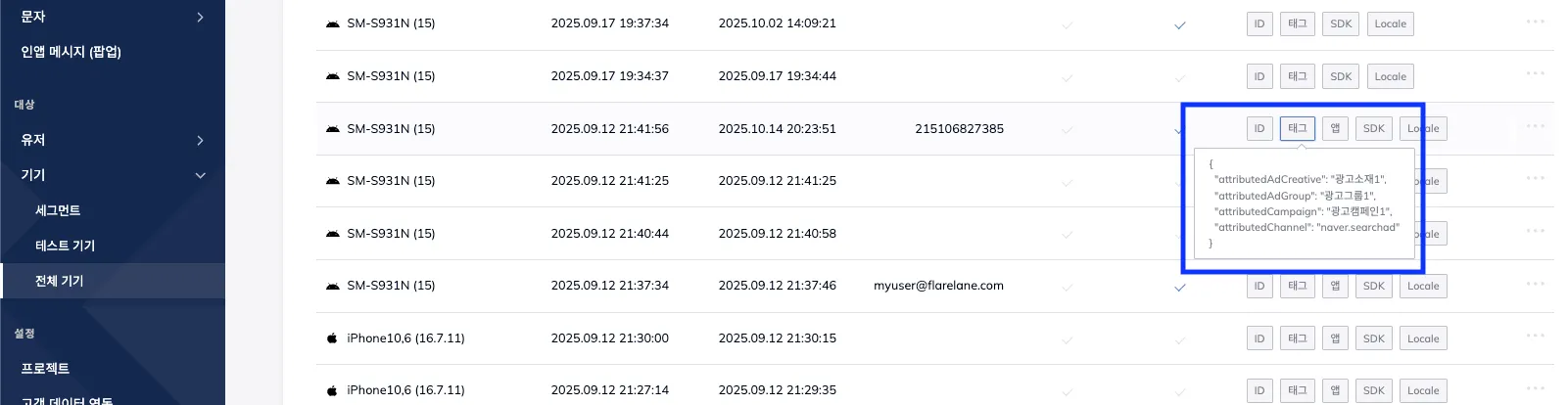
Section titled “연동된 데이터 조회”연동 이후 기기의 태그를 확인해보면 해당 기기의 앱 설치 유입 채널을 나타내는 태그의 연동 결과를 확인할 수 있습니다.
연동한 태그를 바탕으로 세그먼트 타겟팅이나 자동화 진입 조건으로 활용할 수 있으며, 연동된 값에 대한 정확한 의미는 에어브릿지 가이드를 참고 바랍니다.