iOS SDK
1. 事前準備
Section titled “1. 事前準備”- FlareLane コンソールにサインアップし、プロジェクトを作成します。
2. 認証情報の設定
Section titled “2. 認証情報の設定”以下のガイドに沿って、FlareLane がプッシュ通知を送信するために必要な認証情報を入力します。
3. Xcode の設定
Section titled “3. Xcode の設定”3-1. Capability の追加
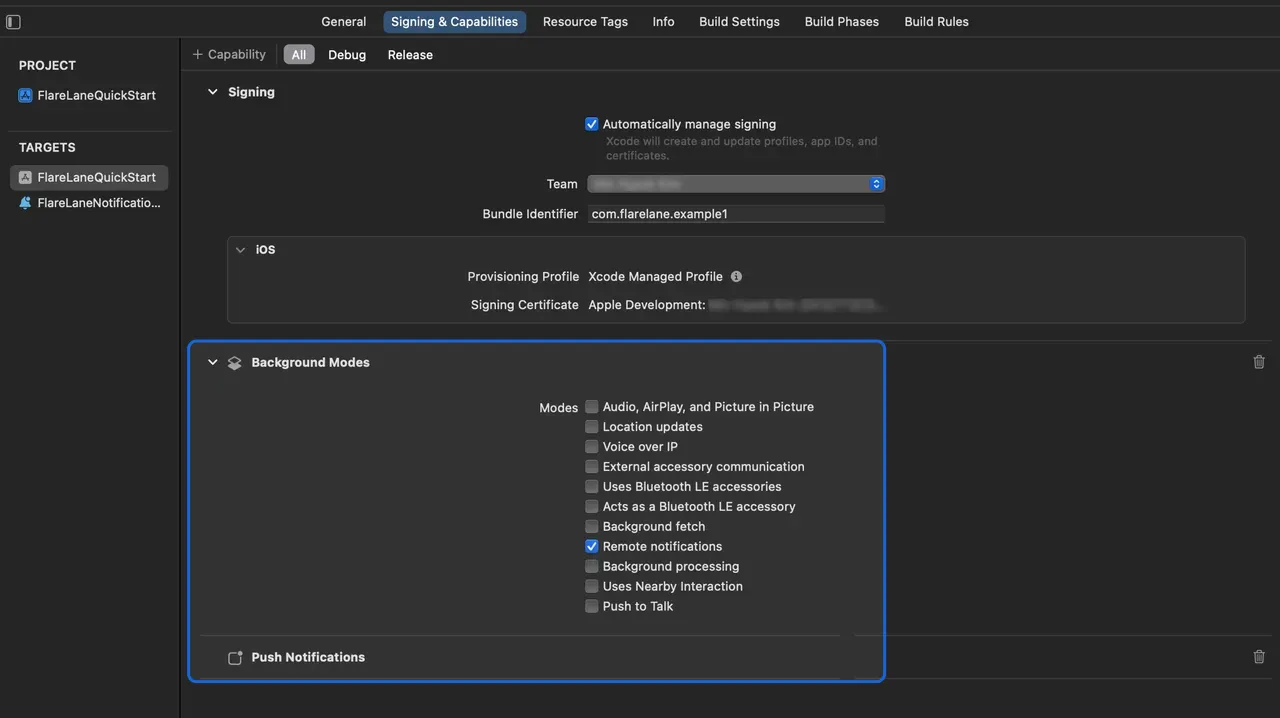
Section titled “3-1. Capability の追加”対象ターゲットの Signing & Capabilities を開き、左上の + Capability をクリックして Push Notifications を追加します。
続いて Background Modes を追加し、Remote notifications を有効にします。
3-2. Service Extension の設定
Section titled “3-2. Service Extension の設定”iOS では、画像などのメディアを添付するために Notification Service Extension が必要です。
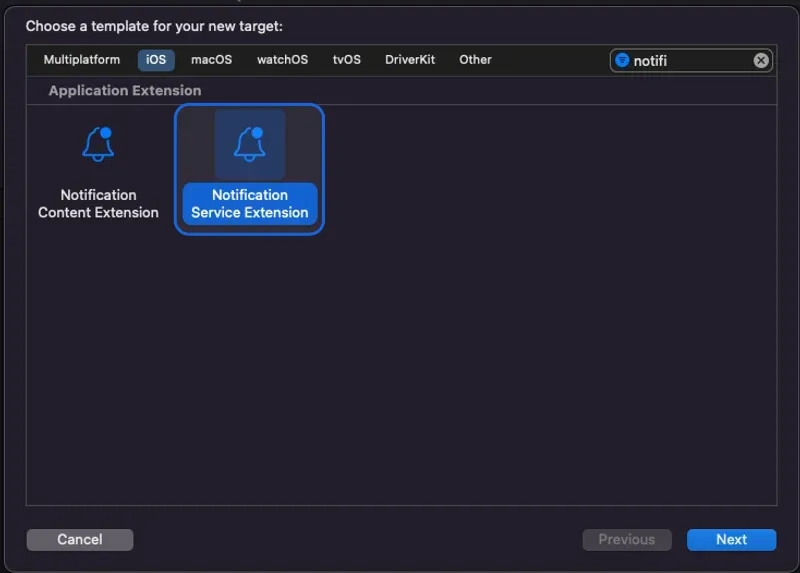
Xcode で File > New > Target を開き、Notification Service Extension を選択します。
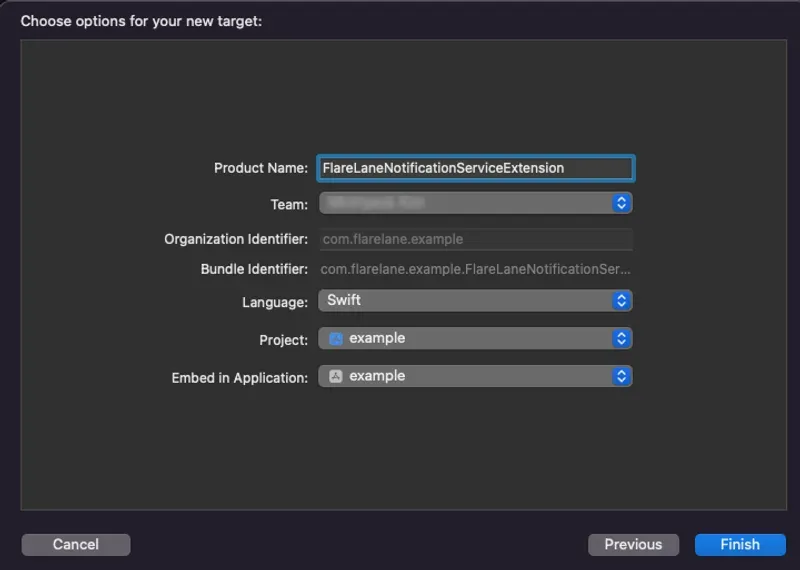
Product Name に適切な名前を入力します。本ガイドでは FlareLaneNotificationServiceExtension を使用します。
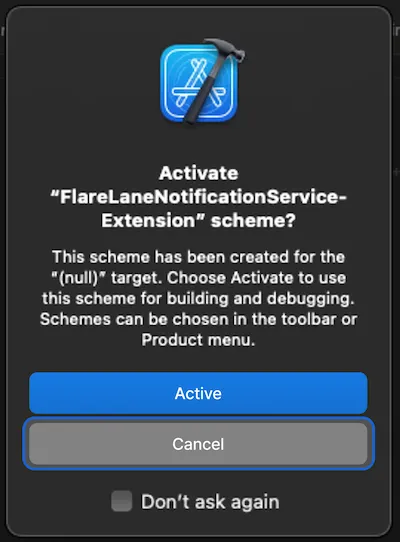
別の Scheme が有効化されないように、Cancel をクリックします。
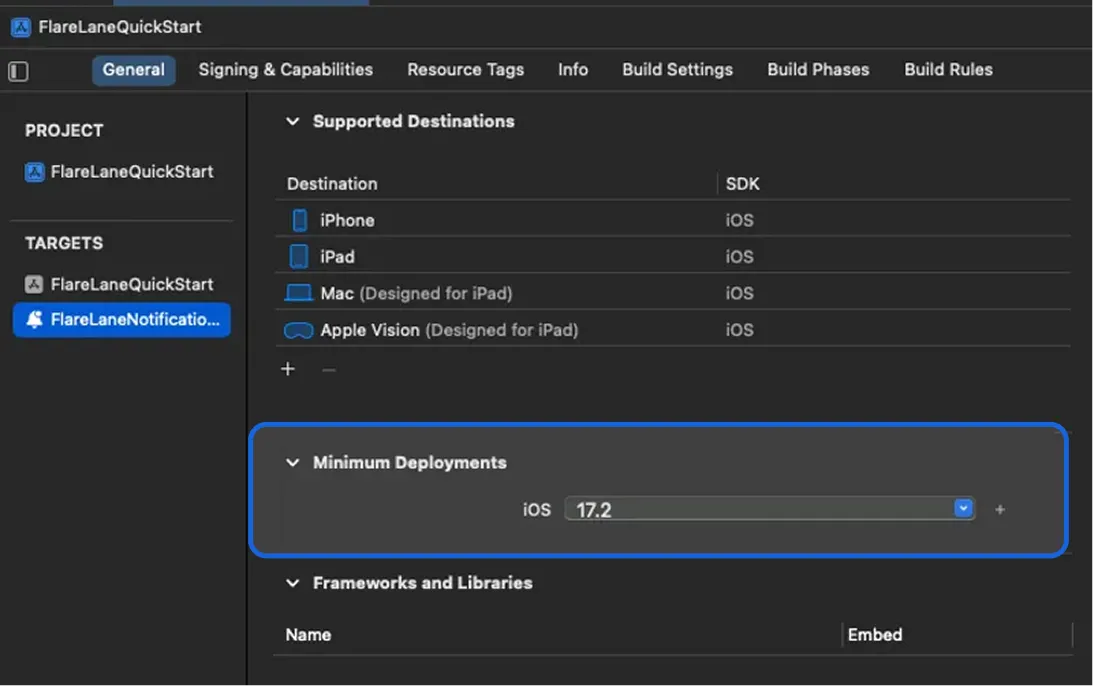
次に、作成した Notification Service Extension ターゲットの Minimum Deployments バージョンを、メインアプリのターゲットのバージョンに合わせて設定します。
3-3. App Group の設定
Section titled “3-3. App Group の設定”メインアプリと Extension の間でデータを同期するために、App Group が必要です。
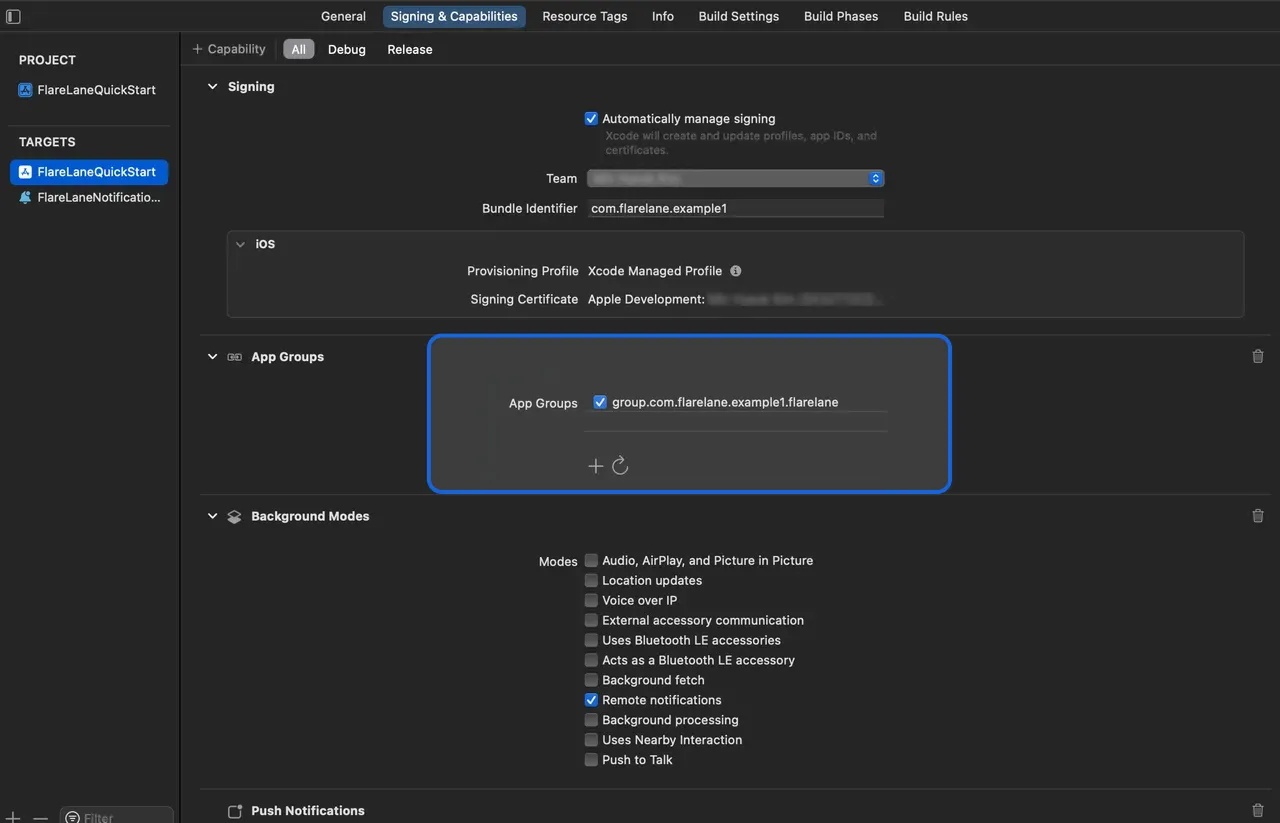
対象ターゲットの Signing & Capabilities を開き、左上の + Capability をクリックして App Groups を追加します。
group.bundleID.flarelane という名前のグループを追加します**。bundleID の部分は、メインアプリの Bundle Identifier と一致させる必要があります。**
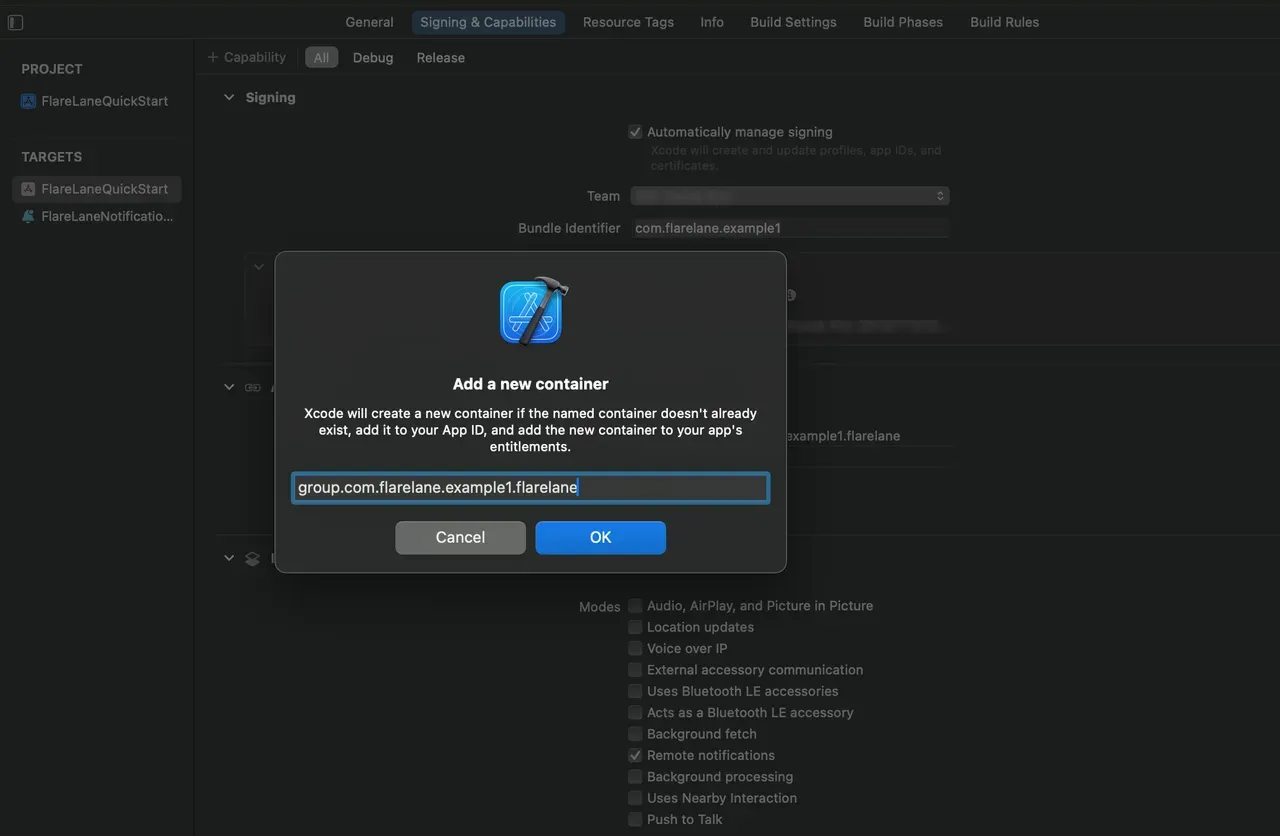
正常に追加できたら、その App Group を有効にします。
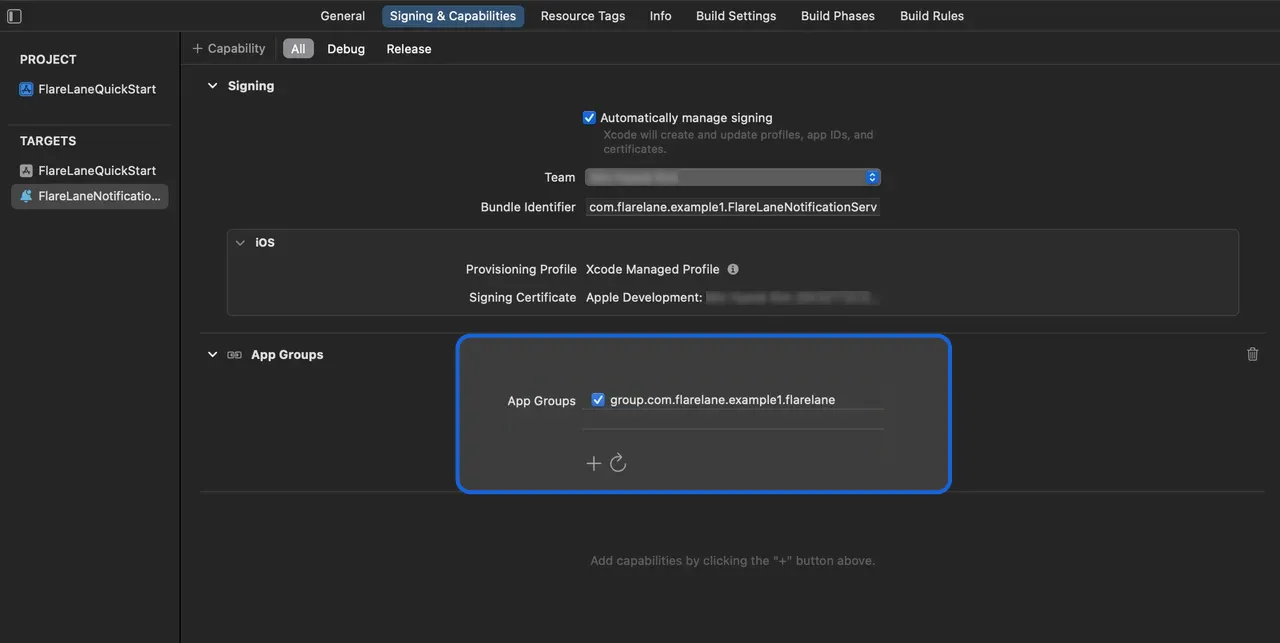
同様に、先ほど作成した Extension にも同じ名前の App Group を追加して有効にします。
4. SDK の連携
Section titled “4. SDK の連携”以下の 2 つの連携方法から、プロジェクトに最も適したものを選択してください。
CocoaPods
Section titled “CocoaPods”Podfile を開いて以下を追加します。
// Dynamic Frameworks を有効にするため、ファイルの先頭に以下の行を追加します。use_frameworks!
target 'YOUR_PROJECT_NAME' do  // 以下の行を追加します  pod 'FlareLane', '1.11.3'end
// ファイルの末尾に以下の行を追加します。// ターゲット名には、先ほど入力した Extension の Product Name を指定してください。target 'FlareLaneNotificationServiceExtension' do  pod 'FlareLane', '1.11.3'end
pod install を実行して SDK のインストールを完了します。
SPM(Swift Package Manager)
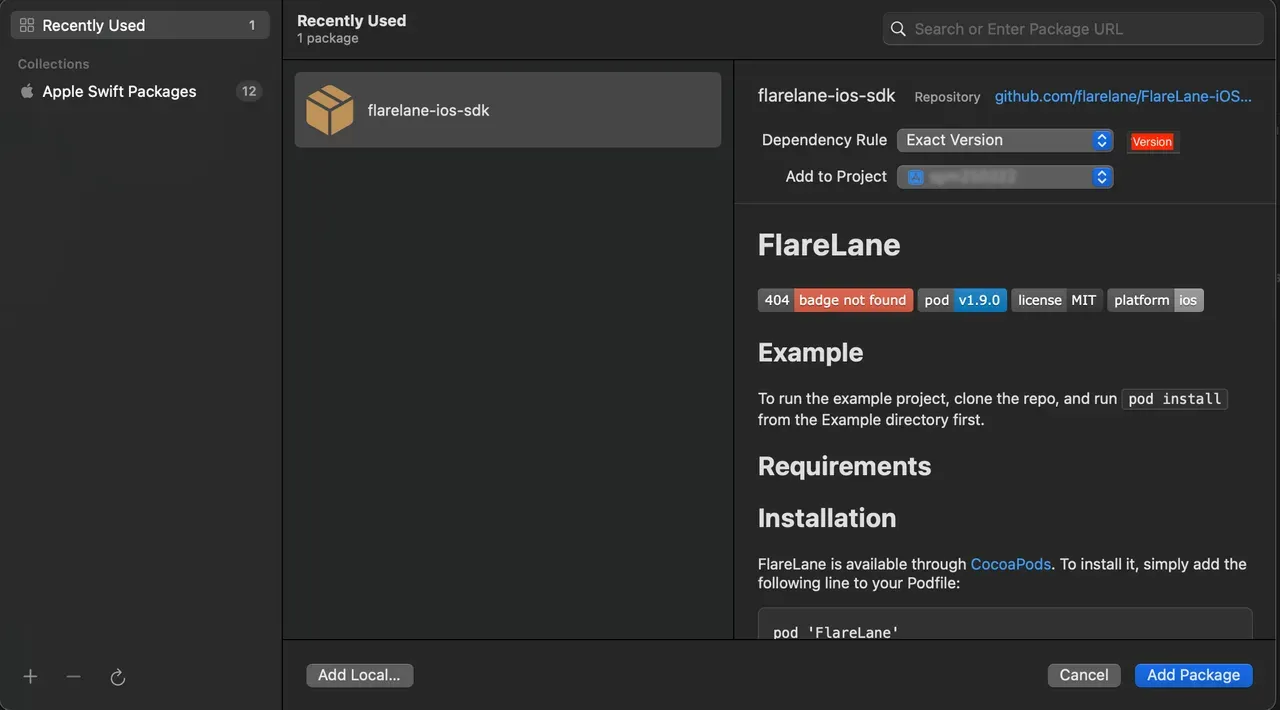
Section titled “SPM(Swift Package Manager)”パッケージ URL に https://github.com/flarelane/FlareLane-iOS-SDK を入力し、Exact Version を 1.11.3 に設定します。
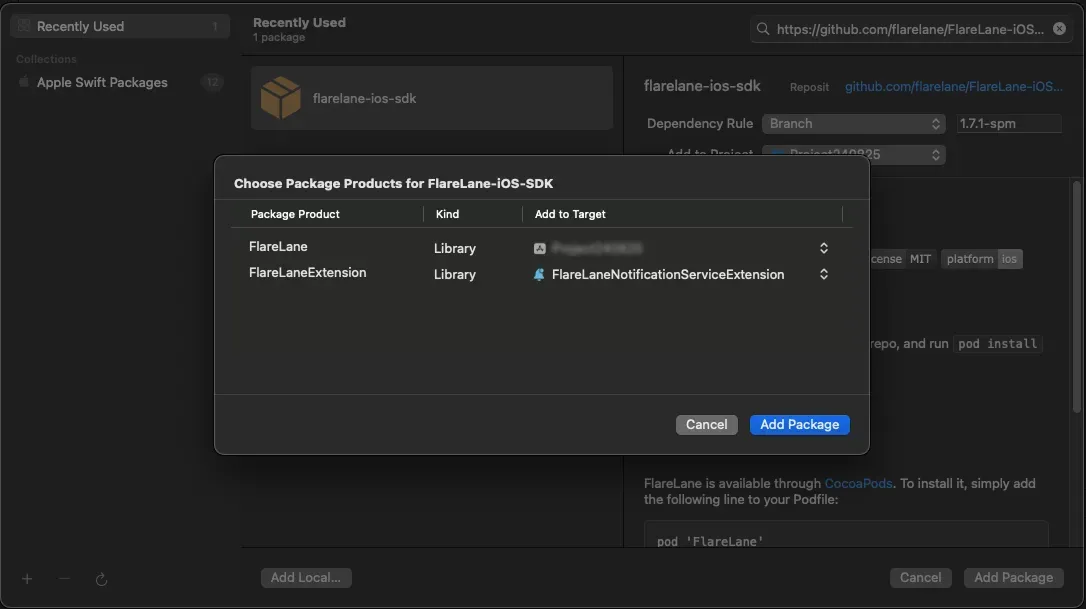
メインターゲットには FlareLane を、Extension ターゲットには FlareLaneExtension を選択します。
5. コードの追加
Section titled “5. コードの追加”5-1.(SwiftUI のみ)AppDelegate.swift の作成
Section titled “5-1.(SwiftUI のみ)AppDelegate.swift の作成”SwiftUI プロジェクトには AppDelegate.swift ファイルが含まれていないため、まずこれを作成する必要があります。
新しく AppDelegate.swift ファイルを作成し、既存の <YOUR_PROJECT_NAME>App.swift ファイルにいくつか変更を加えます。
import UIKit
class AppDelegate: NSObject, UIApplicationDelegate {  func application(_ application: UIApplication, didFinishLaunchingWithOptions launchOptions: [UIApplication.LaunchOptionsKey : Any]? = nil) -> Bool {    return true  }}
struct <YOUR_PROJECT_NAME>App: App { // 以下のコードを追加します @UIApplicationDelegateAdaptor(AppDelegate.self) var appDelegate}5-2. AppDelegate メソッドの追加
Section titled “5-2. AppDelegate メソッドの追加”application(:didFinishLaunchingWithOptions:)メソッドを追加しますapplication(:didRegisterForRemoteNotificationsWithDeviceToken:)メソッドを追加します
import FlareLane
class AppDelegate: UIResponder, UIApplicationDelegate {  func application(_ application: UIApplication, didFinishLaunchingWithOptions launchOptions: [UIApplication.LaunchOptionsKey: Any]?) -> Bool {    // 1    // 通知許可ダイアログを表示するタイミングを制御したい場合は、3 番目の引数を false にして、任意のタイミングで .subscribe() を呼び出してください。    FlareLane.initWithLaunchOptions(launchOptions, projectId: "PROJECT_ID", requestPermissionOnLaunch: true)  }
  func application(_ application: UIApplication, didRegisterForRemoteNotificationsWithDeviceToken deviceToken: Data) {    // 2    FlareLaneAppDelegate.shared.application(application, didRegisterForRemoteNotificationsWithDeviceToken: deviceToken)  }}
@import FlareLane;
@implementation AppDelegate- (BOOL)application:(UIApplication *)application didFinishLaunchingWithOptions:(NSDictionary *)launchOptions { // 1 // 通知許可ダイアログを表示するタイミングを制御したい場合は、3 番目の引数を false にして、任意のタイミングで .subscribe() を呼び出してください。 [FlareLane initWithLaunchOptions:launchOptions projectId:@"PROJECT_ID" requestPermissionOnLaunch:true];}
- (void)application:(UIApplication *)application didRegisterForRemoteNotificationsWithDeviceToken:(NSData *)deviceToken { // 2 [[FlareLaneAppDelegate shared] application:application didRegisterForRemoteNotificationsWithDeviceToken:deviceToken];}5-3. UNUserNotificationCenterDelegate メソッドの追加
Section titled “5-3. UNUserNotificationCenterDelegate メソッドの追加”- AppDelegate を UNUserNotificationCenterDelegate として設定します
userNotificationCenter(:willPresent:withCompletionHandler:)メソッドを追加します- 対応するメソッドを追加します
import FlareLane
@mainclass AppDelegate: UIResponder, UIApplicationDelegate {  func application(_ application: UIApplication, didFinishLaunchingWithOptions launchOptions: [UIApplication.LaunchOptionsKey: Any]?) -> Bool {    // 1    UNUserNotificationCenter.current().delegate = self  }}
extension AppDelegate: UNUserNotificationCenterDelegate { // 2 func userNotificationCenter(_ center: UNUserNotificationCenter, willPresent notification: UNNotification, withCompletionHandler completionHandler: @escaping (UNNotificationPresentationOptions) -> Void) { FlareLaneNotificationCenter.shared.userNotificationCenter(center, willPresent: notification, withCompletionHandler: completionHandler) } // 3 func userNotificationCenter(_ center: UNUserNotificationCenter, didReceive response: UNNotificationResponse, withCompletionHandler completionHandler: @escaping () -> Void) { FlareLaneNotificationCenter.shared.userNotificationCenter(center, didReceive: response, withCompletionHandler: completionHandler) }}#import <UserNotifications/UserNotifications.h>
@interface AppDelegate : UIResponder <..., UNUserNotificationCenterDelegate>@end
// AppDelegate.m@implementation AppDelegate- (BOOL)application:(UIApplication *)application didFinishLaunchingWithOptions:(NSDictionary *)launchOptions{ // 1 [[UNUserNotificationCenter currentNotificationCenter] setDelegate: self];}
// 2- (void)userNotificationCenter:(UNUserNotificationCenter *)center willPresentNotification:(UNNotification *)notification withCompletionHandler:(void (^)(UNNotificationPresentationOptions))completionHandler{ [[FlareLaneNotificationCenter shared] userNotificationCenter:center willPresentNotification:notification withCompletionHandler:completionHandler];}// 3- (void)userNotificationCenter:(UNUserNotificationCenter *)center didReceiveNotificationResponse:(UNNotificationResponse *)response withCompletionHandler:(void (^)())completionHandler{ [[FlareLaneNotificationCenter shared] userNotificationCenter:center didReceiveNotificationResponse:response withCompletionHandler:completionHandler];}@end5-4. UNNotificationServiceExtension メソッドの追加
Section titled “5-4. UNNotificationServiceExtension メソッドの追加”didReceive(:withContentHandler:)メソッドを追加しますserviceExtensionTimeWillExpire()メソッドを追加します
import UserNotificationsimport FlareLane
class NotificationService: UNNotificationServiceExtension {  override func didReceive(_ request: UNNotificationRequest, withContentHandler contentHandler: @escaping (UNNotificationContent) -> Void) {    // 1    // FlareLane から送信されたプッシュ通知に対してのみ FlareLane のメソッドが実行されるよう、ロジックを分岐させます。    if FlareLaneNotificationServiceExtensionHelper.shared.isFlareLaneNotification(request) {      FlareLaneNotificationServiceExtensionHelper.shared.didReceive(request, withContentHandler: contentHandler)    } else {      // ...    }  }
  override func serviceExtensionTimeWillExpire() {    // 2    FlareLaneNotificationServiceExtensionHelper.shared.serviceExtensionTimeWillExpire()  }}
@import FlareLane;
@implementation NotificationService
- (void)didReceiveNotificationRequest:(UNNotificationRequest *)request withContentHandler:(void (^)(UNNotificationContent * _Nonnull))contentHandler { // 1 // FlareLane から送信されたプッシュ通知に対してのみ FlareLane のメソッドが実行されるよう、ロジックを分岐させます。 if ([[FlareLaneNotificationServiceExtensionHelper shared] isFlareLaneNotification:request]) { [[FlareLaneNotificationServiceExtensionHelper shared] didReceive:request withContentHandler:contentHandler]; } else { // ... }}
- (void)serviceExtensionTimeWillExpire { // 2 [[FlareLaneNotificationServiceExtensionHelper shared] serviceExtensionTimeWillExpire];}6. ユーザー ID の連携
Section titled “6. ユーザー ID の連携”アプリをインストールした時点で FlareLane に作成されるデバイスは「匿名デバイス」です。別途管理している一意のユーザー IDを連携することで、FlareLane のデバイスをお客様自身のユーザー ID と紐付けることができます。
ユーザー ID の連携には多くのメリットがあります。 会員と非会員を区別できるようになるほか、いつでもユーザー ID 単位でプッシュ通知を送信できるようになるため、連携の早い段階で設定することをおすすめします。
一般的には、ユーザーがサインアップまたはログインに成功したタイミングで、setUserId 関数を使ってユーザー ID を連携します。
FlareLane.setUserId(userId: "USER_ID")[FlareLane setUserIdWithUserId: @"USER_ID"];7. 追加の連携ガイド
Section titled “7. 追加の連携ガイド”WebView ベースアプリ向けのブリッジ連携
Section titled “WebView ベースアプリ向けのブリッジ連携”- FlareLane は、ウェブサイト上で行われた操作をアプリ側でも認識できるよう、WebView ベースのアプリ向けにさまざまな便利機能を提供しています。WebView ベースのモバイルアプリブリッジガイドをご覧ください。
URL の自動処理
Section titled “URL の自動処理”- FlareLane はデフォルトで、プッシュ通知がクリックされた際に https リンクやディープリンクなどの URL を自動的に処理します。 独自のクリックハンドラーを実装する必要がある場合は、URL の自動処理を無効にするをご覧ください。
アプリ内メッセージ(ポップアップ)の表示
Section titled “アプリ内メッセージ(ポップアップ)の表示”- アプリ内メッセージ(ポップアップ)を参照し、ポップアップを表示したい箇所に**1 行のコード(displayInApp)**を追加します。
その他のリソース
Section titled “その他のリソース”| ガイド |
|---|
| モバイル SDK リファレンス |
| iOS SDK リリースノート |