Writing instructions and sending
Overview
Section titled “Overview”Write the instruction in your message, check the values with a test send, then save.
Step 3. Write the instruction in your message
Section titled “Step 3. Write the instruction in your message”An instruction has a line that calls the API and a line that uses the response.
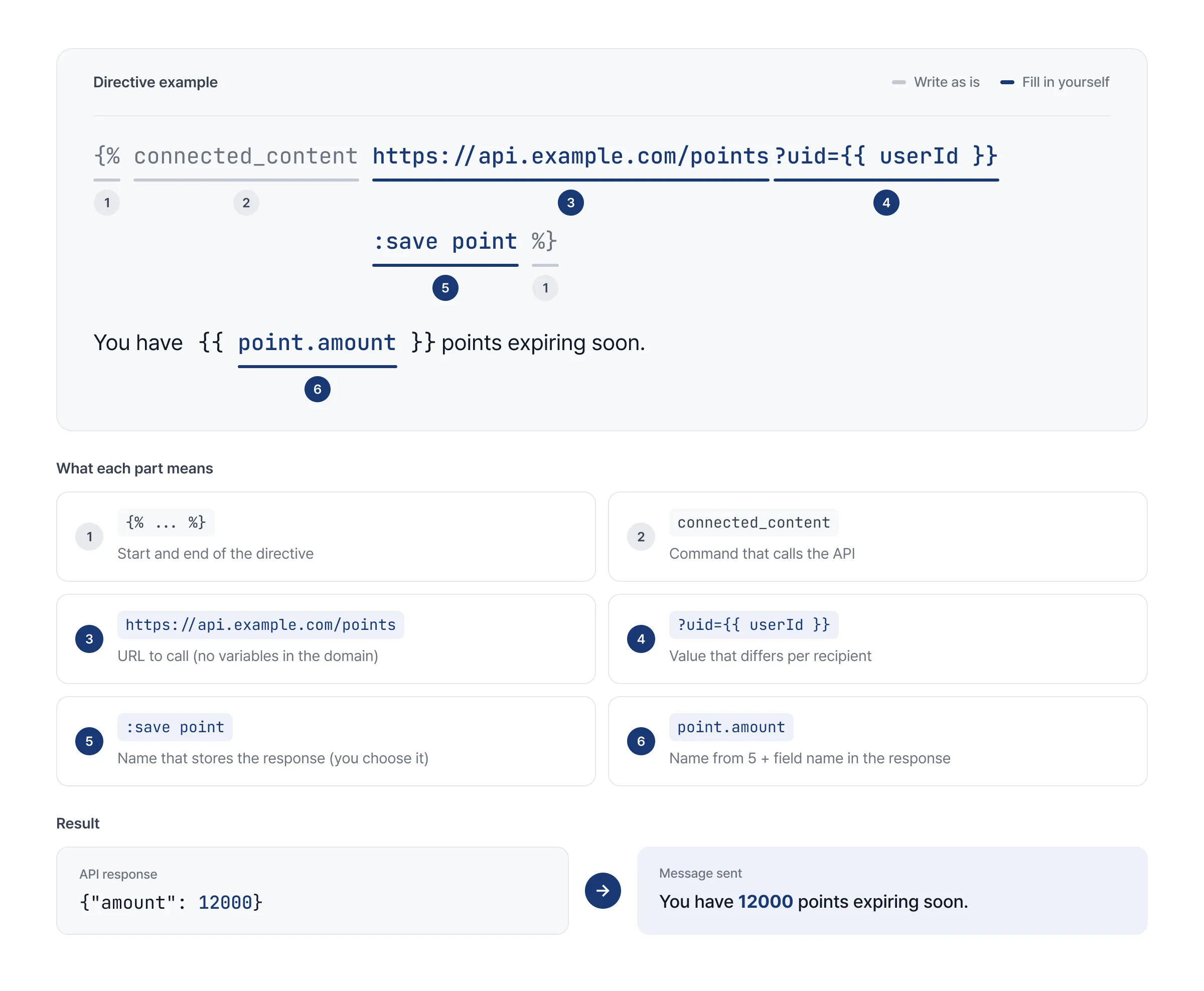
Write the request URL
Section titled “Write the request URL”- You can use personalization variables such as
{{ userId }}and{{ tags.* }}in the path and query string. You can’t use them in the domain. - Wrap values that may contain
@,+, or&, such as email addresses, inurl_encode. Otherwise the value may arrive broken.
{% connected_content https://api.example.com/coupon?uid={{ userId }} %}{% connected_content https://api.example.com/member?email={{ email | url_encode }} :save member %}A variable in the domain can’t be saved.
{% connected_content https://{{ tags.domain }}/coupon %}Choose the request method
Section titled “Choose the request method”| Method | What to write | Watch out for |
|---|---|---|
| GET | Just the URL | - |
| POST | :method post + :body | If you write :body without :method post, it saves, but the body is ignored and the call is made as GET |
| POST to an API that expects JSON | :method post + :body + :content_type application/json | Without :content_type application/json, the API can’t read the data and the value is sent blank |
POST example
The recipient’s value goes into {{ userId }} in :body, so for a recipient whose userId is abc123, uid=abc123 is sent.
{% connected_content https://api.example.com/recommend :method post :body uid={{ userId | url_encode }} :save rec %}Recommended for you: {{ rec.product_name }}Write a JSON body
Section titled “Write a JSON body”Even when sending JSON, write the body as key=value and wrap each value in url_encode. FlareLane converts it to JSON before sending, so special characters such as quotes in a value won’t break it. If there are many options, you can split them across lines.
Even if the name is Kim "Flare" Lane, it’s sent correctly as {"uid": "…", "name": "Kim \"Flare\" Lane"}.
{% connected_content https://api.example.com/recommend :method post :content_type application/json :body uid={{ userId | url_encode }}&name={{ name | url_encode }} :save rec %}If you write JSON directly, the body breaks for recipients whose values contain quotes. The API returns a 400 error and the value is sent blank.
{% connected_content https://api.example.com/recommend :method post :content_type application/json :body {"name": "{{ name }}"} :save rec %}Attach a credential
Section titled “Attach a credential”- Add the credential you copied in Setup after the URL.
- You can’t use Basic and Token together in one instruction.
| Type | Option |
|---|---|
| Basic | :basic_auth credential_name |
| Token | :auth_credentials credential_name |
Read response values
Section titled “Read response values”Whether the response is JSON or plain text depends on the API’s Content-Type response header. Check it against the sample response from your development team. The two formats are read differently.
| JSON response | Plain text response | |
|---|---|---|
| Where the value goes | Wherever you write {{ name.field }} | Where the instruction is written (the whole response) |
:save | Sets the name. If omitted, connected | Still printed where the instruction is |
| Use in several places | Yes | No. If you need to, ask your development team for a JSON response ({"code": "SAVE20-8F3K"}) |
| HTTP status code | {{ name.__http_status_code__ }} | Not available |
JSON response
Section titled “JSON response”Set a name with :save, then add a dot (.) after the name to read a field. You can use the same value in several places, and it’s easy to add more values later.
{% connected_content https://api.example.com/points?uid={{ userId }} :save point %}You have {{ point.amount }} points expiring. Use them by {{ point.expires_at }}.| Response | Message sent |
|---|---|
{"amount": 12000, "expires_at": "Sep 30"} | You have 12000 points expiring. Use them by Sep 30. |
Plain text response
Section titled “Plain text response”Write the instruction right where the value should go. This example uses a public weather service to insert the current temperature in the user’s city.
It's {% connected_content https://wttr.in/{{ tags.city }}?format=%t %} in {{ tags.city }} today. Dress for the weather before you head out!| User attribute | Response | Message sent |
|---|---|---|
tags.city = Seoul | +17°C | It’s +17°C in Seoul today. Dress for the weather before you head out! |
Prepare for failed calls
Section titled “Prepare for failed calls”In the instruction
Section titled “In the instruction”If a call fails, the value is left blank. We recommend choosing one of these three and writing it in advance.
| What you want | Syntax | Good to know |
|---|---|---|
| Show fallback text (recommended) | default: | Inserts the text you set when the value is empty. |
| Show the sentence only when there’s a value | {% if %} | Keeps the sentence from reading awkwardly. Check the field in the condition, not the name. |
| Don’t send to this recipient | abort_message | Use it when the message is pointless without the value, such as a coupon code. Counted as a failed send and not billed. |
Check for failure in a condition
Section titled “Check for failure in a condition”To show a value only when it exists, or to skip sending, check in a condition whether the call failed. There are two ways to check.
| Check | Condition | Good to know |
|---|---|---|
| Whether the field is empty | point.amount == blank | True if the call failed, or if it succeeded but the field is empty. |
| HTTP status code | point.__http_status_code__ != 200 | If the call fails, the status code is empty, so this is true. It’s part of a JSON object response, so don’t use it with plain text APIs. |
In conditions too, check the field, not the name. Using only the name means the message can’t be saved.
{% if point == blank %}{% abort_message %}{% endif %}Set up response reuse
Section titled “Set up response reuse”When the same URL is called again, FlareLane doesn’t call the API every time. It reuses the earlier response for a set period. In most cases you can leave the default behavior as is, and only add an option when you need to change it.
Default behavior
Section titled “Default behavior”| Case | Behavior |
|---|---|
| GET calls | The response for the same URL is reused for 5 minutes. Within the same project, responses from other messages and campaigns are reused too |
| POST calls | Reused only when :cache_max_age is set, and only if the body is also the same |
| Values that differ per recipient | Not reused if the URL, body, or headers contain userId, email, phoneNumber, or dob |
| Failed responses | Not reused. Called again next time |
- Example: a weather call that only includes
tags.cityreuses responses per city, so even with many recipients it’s called only once per city. - When many recipients are processed at the same time, the same URL may still be called several times. The cache reduces calls but doesn’t guarantee exactly one call.
Change it with options
Section titled “Change it with options”| When | What to write |
|---|---|
| The value must always be current, such as stock | :no_cache |
| The call returns the same value for every recipient, and you want to reuse it longer to reduce calls | :cache_max_age 3600 (in seconds, 3600 seconds = 1 hour) |
| You want to reuse POST responses | :cache_max_age (POST is reused only with this option) |
For the range you can set with :cache_max_age, see Limits.
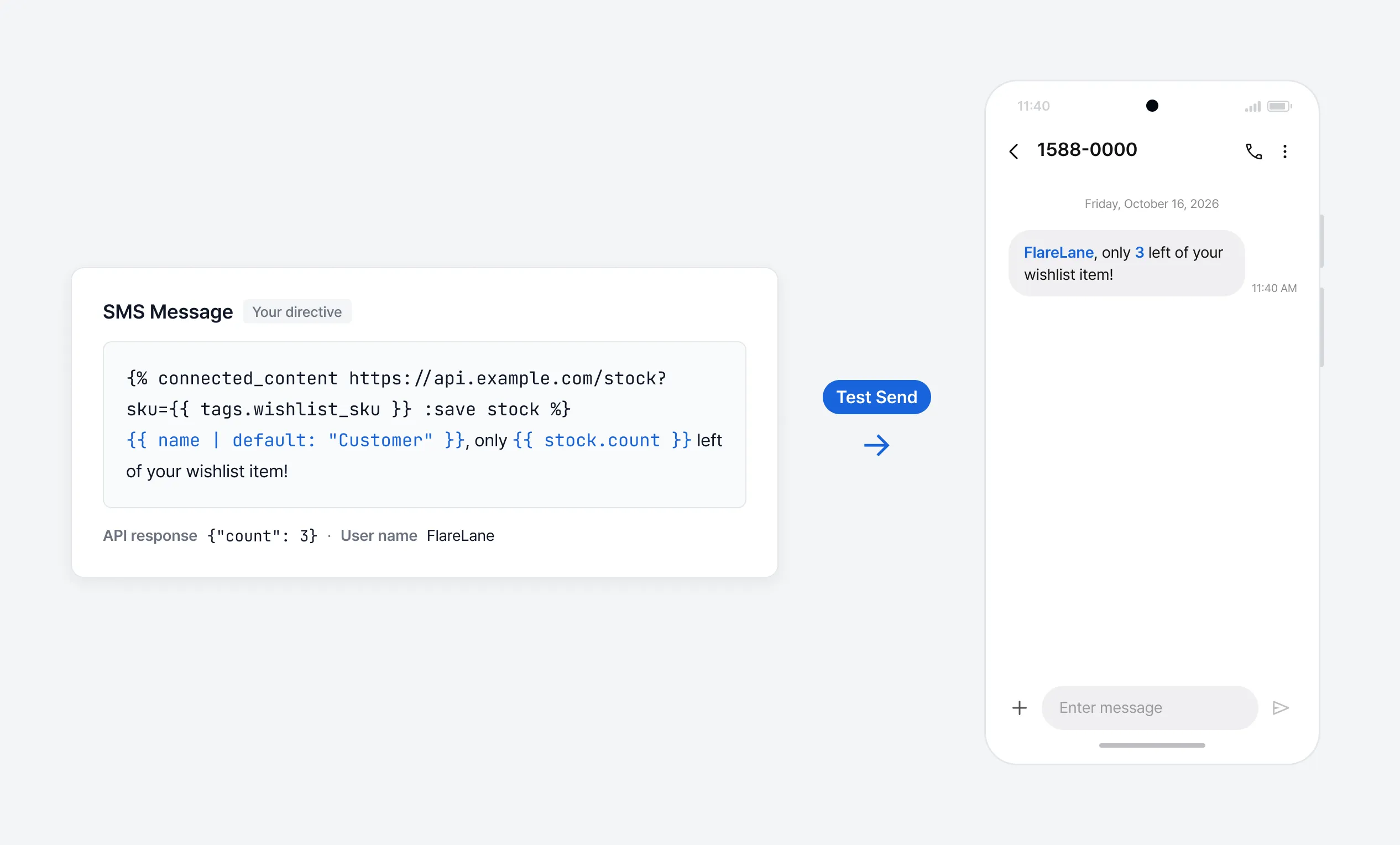
Step 4. Check with a test send
Section titled “Step 4. Check with a test send”- We recommend checking the final message with a test send before sending.
- A test send works the same as a real send.
- Your API is actually called.
- The automatic check in step 5 applies the same way.
- If no user is linked to the phone number or email you specify, user information such as
{{ userId }}may be empty.
Step 5. Send, schedule, or save a journey
Section titled “Step 5. Send, schedule, or save a journey”- Instructions are checked automatically when you send immediately or save a scheduled send, recurring send, journey automation, or email template. If they break the rules, the message isn’t saved or sent.
- For the rules, see When saving is rejected.