Chat-Style Notifications
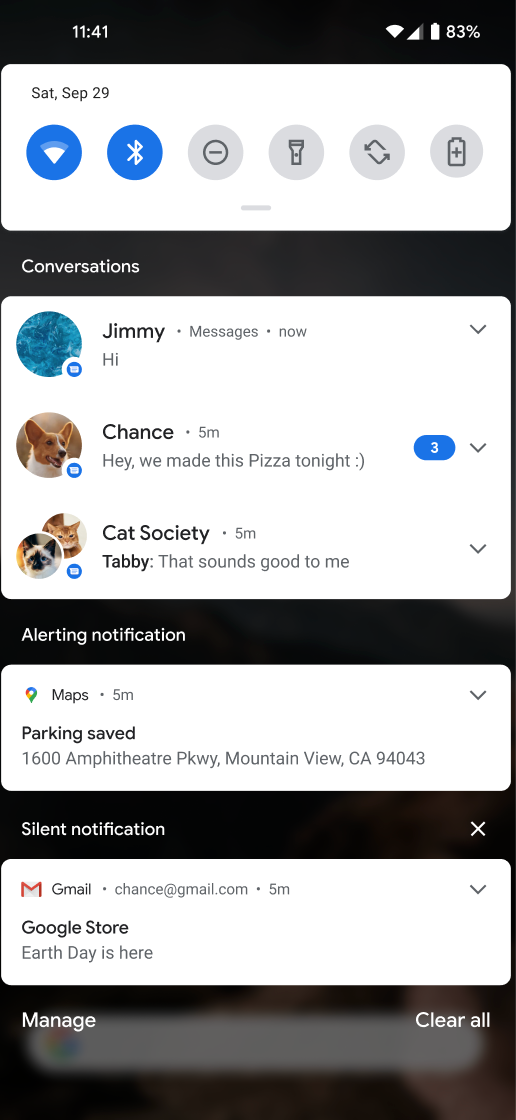
Chat-style notifications make your push look like a messenger conversation. The sender’s profile picture replaces the app icon and the sender’s name appears in place of the title, which stands out far more than a regular notification.
They work especially well for messages that feel like they come from a person: 1:1 support chats, friend activity, or a dedicated manager reaching out.
Requirements
Section titled “Requirements”| Item | Requirement |
|---|---|
| FlareLane SDK | Android · iOS · React Native · Flutter 1.11.0+ |
| OS | iOS 15+ / Android 7.0+ |
See the official platform docs as well: Apple - Implementing communication notifications · Android - Conversation notifications
iOS app setup (required)
Section titled “iOS app setup (required)”Apple requires the app itself to opt in to communication notifications. Without this setup nothing breaks, and notifications simply render as normal ones without the profile picture.
Add the Communication Notifications capability
In Xcode: app target → Signing & Capabilities → + Capability → Communication Notifications.
Add to the app’s Info.plist (the app, not the Notification Service Extension)
<key>NSUserActivityTypes</key><array><string>INSendMessageIntent</string></array>
This assumes your FlareLane iOS integration (including the Notification Service Extension) is complete. If not, start with the iOS SDK integration guide.
Android app setup
Section titled “Android app setup”No additional setup required. With SDK 1.11.0+, the payload alone is enough.
React Native / Flutter
Section titled “React Native / Flutter”The native SDKs handle everything, so no extra code is needed. For iOS, apply the same iOS app setup.
Sending
Section titled “Sending”Add a communication object to your Open API notification request.
curl -X POST "https://api.flarelane.com/v1/projects/{PROJECT_ID}/notifications" \ -H "Authorization: Bearer {API_KEY}" \ -H "Content-Type: application/json" \ -d '{ "targetType": "all", "body": "The item you asked about is back in stock! Want to take a look? 😊", "communication": { "senderName": "Hana (Manager)", "senderImageUrl": "https://cdn.example.com/profiles/manager-hana.png" } }'| Field | Required | Description |
|---|---|---|
senderName | ✅ | Sender display name, shown in place of the title. Supports Liquid variables |
senderImageUrl | ✅ | Sender profile image URL. A square image under 1MB is recommended |
To group messages from the same sender into one conversation, we recommend combining this with Notification Grouping (threadId). Messages sharing the same threadId are threaded together as a single conversation, following each platform’s conversation-grouping behavior.
Personalization example
Section titled “Personalization example”Combine tags and Liquid variables to send from a different sender per user.
{ "targetType": "all", "body": "I just hit level 30! Come play with me 🎮", "threadId": "friend_{{ tags.friend_id }}", "communication": { "senderName": "{{ tags.friend_name }}", "senderImageUrl": "https://cdn.example.com/profiles/{{ tags.friend_id }}.png" }}Troubleshooting
Section titled “Troubleshooting”If the profile picture doesn’t show up, check the following in order:
- Device is iOS 15+ and SDK is 1.11.0+
- The Communication Notifications capability is added to the app target
NSUserActivityTypeswithINSendMessageIntentis in the app’s Info.plist (not the extension’s; this is the most common miss)senderImageUrlopens correctly in a browser and the image is not oversized (under 1MB recommended)- Rebuild, then delete and reinstall the app (entitlement changes may require a reinstall)