Android SDK
1. Prerequisites
Section titled “1. Prerequisites”- Sign up in the FlareLane Console and create a project.
2. Set Up Credentials
Section titled “2. Set Up Credentials”Follow the guide below to enter the credentials FlareLane needs to send push notifications.
3. Integrate the SDK with Gradle
Section titled “3. Integrate the SDK with Gradle”dependencyResolutionManagement { repositories { // Add the line below maven("https://jitpack.io") }}dependencyResolutionManagement { repositories { // Add the line below maven { url 'https://jitpack.io' } }}allprojects { repositories { // Add the line below maven { url 'https://jitpack.io' } }}Add the following to your app-level build.gradle (<project>/<app>/build.gradle).
dependencies { // Add the line below implementation("com.github.flarelane:flarelane-android-sdk:1.10.0")}dependencies { // Add the line below implementation 'com.github.flarelane:flarelane-android-sdk:1.10.0'}4. Add the Initialization Code
Section titled “4. Add the Initialization Code”In your AndroidManifest.xml file, set android.name=".MainApplication" and use the editor's quick-fix to create the MainApplication class file. You can also create the class file manually.
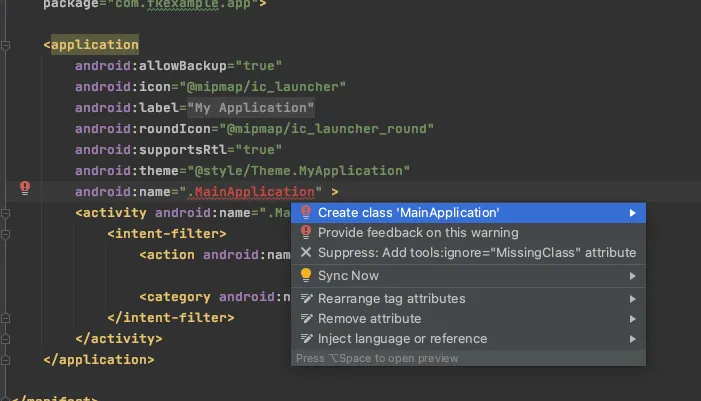
Add the FlareLane.initWithContext function inside the onCreate method. You can find your project ID on the [Project] page in the console.
import com.flarelane.FlareLane
class MainApplication : Application() {    override fun onCreate() {        super.onCreate()
        // Add the code below        // To control when the notification permission prompt appears, set the third parameter to false and call .subscribe() at the appropriate time.        FlareLane.initWithContext(this, "PROJECT_ID", true)    }}
import com.flarelane.FlareLane;
public class MainApplication extends Application { @Override public void onCreate() { super.onCreate();
// Add the code below // To control when the notification permission prompt appears, set the third parameter to false and call .subscribe() at the appropriate time. FlareLane.initWithContext(this, "PROJECT_ID", true); }}5. Link a User ID
Section titled “5. Link a User ID”When the app is installed, the device created in FlareLane is an "anonymous device." By linking the unique User ID that you manage separately, you can match FlareLane's device to your own User ID.
Linking a User ID has many benefits. It lets you distinguish between members and non-members, and lets you send push notifications by User ID at any time, so we recommend setting it up early in your integration.
Typically, you link the User ID through the setUserId function when a user signs up or logs in successfully.
FlareLane.setUserId(this, "USER_ID")FlareLane.setUserId(this, "USER_ID");6. Additional Integration Guides
Section titled “6. Additional Integration Guides”Bridge Integration for WebView-Based Apps
Section titled “Bridge Integration for WebView-Based Apps”- FlareLane offers a variety of convenience features for WebView-based apps so that actions taken on the website can also be recognized in the app. See the WebView-based mobile app bridge guide.
Automatic URL Handling
Section titled “Automatic URL Handling”- By default, FlareLane automatically handles URLs such as https links and deep links when a push notification is clicked. If you need to implement your own click handler, see Disable Automatic URL Handling.
Displaying In-App Messages (Pop-ups)
Section titled “Displaying In-App Messages (Pop-ups)”- See In-App Messages (Pop-ups) and add a single line of code (displayInApp) at the point where you want the pop-up to appear.
Setting the Notification Color
Section titled “Setting the Notification Color”<resources> <!-- Change the notification color --> <string name="flarelane_notification_accent_color">#BC0000</string></resources>Setting Up Notification Channels
Section titled “Setting Up Notification Channels”- See Android: Set Up Notification Channels to configure Android notification channels suited to your service.
Setting the Notification Icon
Section titled “Setting the Notification Icon”- See Android: Set Up the Notification Icon to set up your icon assets.
Other Resources
Section titled “Other Resources”| Guide |
|---|
| Mobile SDK Reference |
| Android SDK Release Notes |