Airbridge Integration
With Airbridge, you can analyze which ad channels and campaigns drove your users to install your app. By integrating these install acquisition paths into FlareLane, you can run CRM marketing optimized for each acquisition path.
Available data
Section titled “Available data”Airbridge provides the following attribution data. This guide covers integrating four of these data points, but if you have collected all of them, you can integrate the rest as well.
| Key | Description |
|---|---|
| attributedChannel | Channel |
| attributedCampaign | Campaign |
| attributedAdGroup | Ad group |
| attributedAdCreative | Ad creative |
| attributedContent | Content |
| attributedTerm | Keyword |
| attributedSubPublisher | Sub-publisher |
| attributedSubSubPublisher1 | Sub-sub-publisher 1 |
| attributedSubSubPublisher2 | Sub-sub-publisher 2 |
| attributedSubSubPublisher3 | Sub-sub-publisher 3 |
How to integrate the data
Section titled “How to integrate the data”You can retrieve acquisition path (attribution) data through the Airbridge SDK and then integrate that data into FlareLane as tags.
Android SDK
Section titled “Android SDK”class MainApplication : Application() { override fun onCreate() { super.onCreate()
FlareLane.initWithContext(this, "PROJECT_ID", true)
val option = AirbridgeOptionBuilder("YOUR_APP_NAME", "YOUR_APP_SDK_TOKEN") .setOnAttributionReceived(object : OnAttributionResultReceiveListener { override fun onAttributionResultReceived(result: Map<String, String>) { val tags = JSONObject() result["attributedChannel"]?.let { tags.put("attributedChannel", it) } result["attributedCampaign"]?.let { tags.put("attributedCampaign", it) } result["attributedAdGroup"]?.let { tags.put("attributedAdGroup", it) } result["attributedAdCreative"]?.let { tags.put("attributedAdCreative", it) }
if (tags.length() > 0) { FlareLane.setTags(applicationContext, tags) } } }) .build() Airbridge.initializeSDK(this, option) }}public class MainApplication extends Application { @Override public void onCreate() { super.onCreate();
FlareLane.initWithContext(this, "PROJECT_ID", true);
AirbridgeOption option = new AirbridgeOptionBuilder("YOUR_APP_NAME", "YOUR_APP_SDK_TOKEN") .setOnAttributionReceived(new OnAttributionResultReceiveListener() { @Override public void onAttributionResultReceived(@NonNull Map<String, String> result) { JSONObject tags = new JSONObject(); try { if (result.get("attributedChannel") != null) { tags.put("attributedChannel", result.get("attributedChannel")); } if (result.get("attributedCampaign") != null) { tags.put("attributedCampaign", result.get("attributedCampaign")); } if (result.get("attributedAdGroup") != null) { tags.put("attributedAdGroup", result.get("attributedAdGroup")); } if (result.get("attributedAdCreative") != null) { tags.put("attributedAdCreative", result.get("attributedAdCreative")); }
if (tags.length() > 0) { FlareLane.setTags(getApplicationContext(), tags); } } catch (JSONException e) { // Handling Exception... } } }) .build(); Airbridge.initializeSDK(this, option); }}iOS SDK
Section titled “iOS SDK”import FlareLaneimport Airbridge
@mainclass AppDelegate: UIResponder, UIApplicationDelegate {
func application(_ application: UIApplication, didFinishLaunchingWithOptions launchOptions: [UIApplication.LaunchOptionsKey: Any]?) -> Bool { FlareLane.initWithLaunchOptions(launchOptions, projectId: "PROJECT_ID", requestPermissionOnLaunch: true)
let option = AirbridgeOptionBuilder(name: "YOUR_APP_NAME", token: "YOUR_APP_SDK_TOKEN") .setOnAttributionReceived({ attribution in var tags: [String: Any] = [:]
if let attributedChannel = attribution["attributedChannel"] { tags["attributedChannel"] = attributedChannel } if let attributedCampaign = attribution["attributedCampaign"] { tags["attributedCampaign"] = attributedCampaign } if let attributedAdGroup = attribution["attributedAdGroup"] { tags["attributedAdGroup"] = attributedAdGroup } if let attributedAdCreative = attribution["attributedAdCreative"] { tags["attributedAdCreative"] = attributedAdCreative }
if !tags.isEmpty { FlareLane.setTags(tags: tags) } }) .build() Airbridge.initializeSDK(option: option)
return true }#import "AppDelegate.h"@import FlareLane;#import <Airbridge/Airbridge.h>
@implementation AppDelegate
- (BOOL)application:(UIApplication *)application didFinishLaunchingWithOptions:(NSDictionary *)launchOptions {
[FlareLane initWithLaunchOptions:launchOptions projectId:@"PROJECT_ID" requestPermissionOnLaunch:YES];
AirbridgeOptionBuilder* optionBuilder = [[AirbridgeOptionBuilder alloc] initWithName:@"YOUR_APP_NAME" token:@"YOUR_APP_SDK_TOKEN"]; [optionBuilder setOnAttributionReceived:^(NSDictionary<NSString *,NSString *> * attribution) { NSMutableDictionary *tags = [[NSMutableDictionary alloc] init];
if (attribution[@"attributedChannel"]) { [tags setObject:attribution[@"attributedChannel"] forKey:@"attributedChannel"]; } if (attribution[@"attributedCampaign"]) { [tags setObject:attribution[@"attributedCampaign"] forKey:@"attributedCampaign"]; } if (attribution[@"attributedAdGroup"]) { [tags setObject:attribution[@"attributedAdGroup"] forKey:@"attributedAdGroup"]; } if (attribution[@"attributedAdCreative"]) { [tags setObject:attribution[@"attributedAdCreative"] forKey:@"attributedAdCreative"]; }
if (tags.count > 0) { [FlareLane setTagsWithTags:tags]; } }]; AirbridgeOption* option = [optionBuilder build]; [Airbridge initializeSDKWithOption:option];
return YES;}React Native SDK
Section titled “React Native SDK”FlareLane.initialize('PROJECT_ID');
Airbridge.setOnAttributionReceived(attribution => { const tags: {[key: string]: string} = {};
if (attribution.attributedChannel) { tags.attributedChannel = attribution.attributedChannel; } if (attribution.attributedCampaign) { tags.attributedCampaign = attribution.attributedCampaign; } if (attribution.attributedAdGroup) { tags.attributedAdGroup = attribution.attributedAdGroup; } if (attribution.attributedAdCreative) { tags.attributedAdCreative = attribution.attributedAdCreative; }
if (Object.keys(tags).length > 0) { FlareLane.setTags(tags); }});Flutter SDK
Section titled “Flutter SDK”FlareLane.shared.initialize("PROJECT_ID", requestPermissionOnLaunch: true);
Airbridge.setOnAttributionReceived((result) { Map<String, String> tags = {};
if (result['attributedChannel'] != null) { tags['attributedChannel'] = result['attributedChannel']!; } if (result['attributedCampaign'] != null) { tags['attributedCampaign'] = result['attributedCampaign']!; } if (result['attributedAdGroup'] != null) { tags['attributedAdGroup'] = result['attributedAdGroup']!; } if (result['attributedAdCreative'] != null) { tags['attributedAdCreative'] = result['attributedAdCreative']!; }
if (tags.isNotEmpty) { FlareLane.shared.setTags(tags); }});Reviewing the integrated data
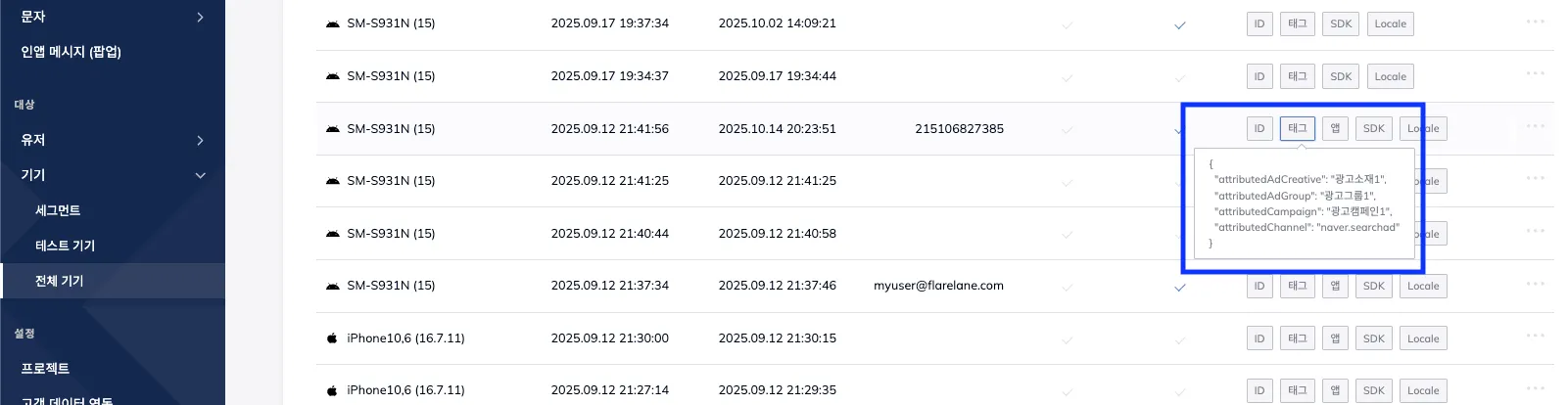
Section titled “Reviewing the integrated data”After integration, check the device's tags to see the result: tags that indicate the app-install acquisition channel for that device.
You can use these integrated tags for segment targeting or as automation entry conditions. For the exact meaning of each integrated value, refer to the Airbridge documentation.