User Attributes & Tags
Values that define a customer—from name and date of birth to remaining points, level, and marketing opt-in status—are integrated through user attributes and custom tags. With these, you can split customers into segment groups or automate message delivery.
Difference between user attributes and tags
Section titled “Difference between user attributes and tags”User attributes are special data such as phone number and date of birth that you integrate in a predefined format and use across many features. Any other free-form data is integrated as custom tags.
| User attributes | Custom tags | |
|---|---|---|
| Target | User | User, device |
| Format | Predefined | Free-form |
| Data | Only certain data (phone number, date of birth, time zone, etc.) | No restrictions |
| Purpose | Sending to phone numbers, birthday segments, etc. | Segments (tags), personalized messages, etc. |
Integrating user attributes
Section titled “Integrating user attributes”For user-specific data that ties closely into FlareLane's various features, integrate the user attribute data below in the correct format.
Available attributes
Section titled “Available attributes”| key | value | |
|---|---|---|
| abc@example.com | ||
| Phone number | phoneNumber | E.164 format (+821011112222) |
| Date of birth | dob | YYYY-MM-DD (1992-03-01) |
| Time zone | timeZone | tz database (Asia/Seoul) |
| Name | name | No restrictions |
| Country | country | ISO-3166-1 alpha-2 standard (KR) |
| Language | language | ISO-639-1 standard (ko) |
How to integrate
Section titled “How to integrate”Use the userAttributes value of the track API.
Use the API below for periodic syncing via bulk batches and the like:
- REST API:
POST /v1/projects/PROJECT_ID/track
Example: integrating user attributes via the API
curl --request POST \ --url https://api.flarelane.com/v1/projects/PROJECT_ID/track \ --header 'Authorization: Bearer API_KEY' \ --header 'accept: application/json' \ --header 'content-type: application/json' \ --data '{ "userAttributes": [ { "userId": "userid1", "name": "name", "phoneNumber": "+821011112222", "email": "john@example.com", "dob": "1990-01-01", "timeZone": "Asia/Seoul", "country": "KR", "language": "ko" } ]}'Verifying integrated user attributes
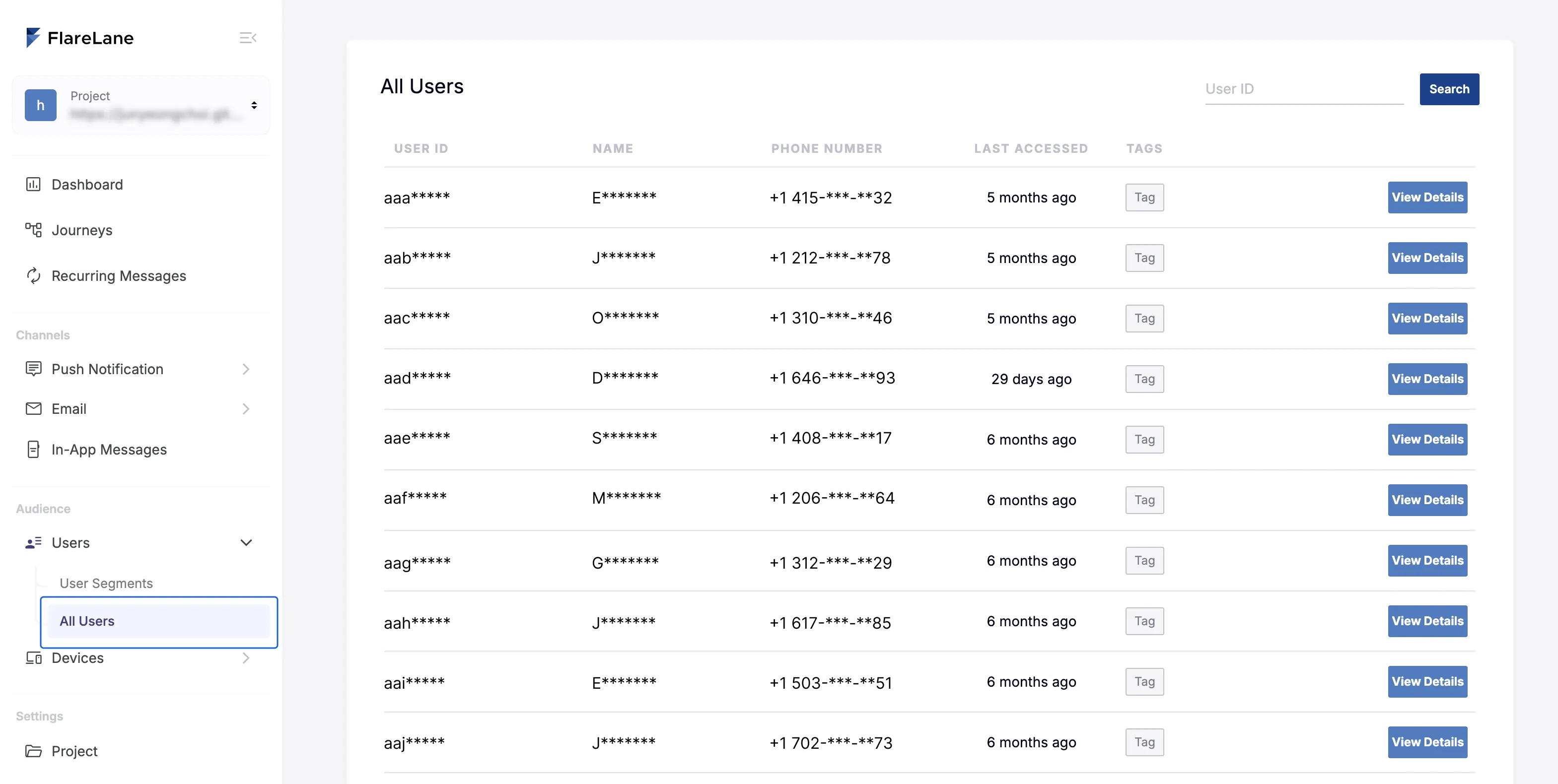
Section titled “Verifying integrated user attributes”You can review the integrated user attributes in the user list.
Integrating tags
Section titled “Integrating tags”Beyond user attributes, free-form attribute values such as purchase history, owned coupon lists, and marketing opt-in status are integrated as tags. Using integrated tags, you can perform more granular segment targeting or use them as hyper-personalization message variables.
An example of tags is shown below.
{ "gender": "male", "order_count": 2, "liked_products": [1,2,3], "coupon_names": ["coupon1","coupon2","coupon3"], "firstPurchasedAt": "2024-04-19T14:23:56+09:00" "ad_agreement_datetime": "2024-04-19T14:23:56+09:00"}How to integrate
Section titled “How to integrate”You can use the tags value of the track API, and you can also add tags via the SDK.
When you integrate tags, only the tags you include are applied. To delete a tag, set its value to null.
Use the API below for periodic syncing via bulk batches and the like:
- REST API:
POST /v1/projects/PROJECT_ID/track
When values change on the client side:
- Web SDK / Mobile SDK:
FlareLane.setTags({ key: value }})
Example: integrating tags via the API
curl --request POST \ --url https://api.flarelane.com/v1/projects/PROJECT_ID/track \ --header 'Authorization: Bearer API_KEY' \ --header 'accept: application/json' \ --header 'content-type: application/json' \ --data '{ "tags": [ { "subjectType": "user", "subjectId": "userid1", "tags": { "gender": "male", "order_count": 2, "liked_products": [1,2,3], "coupon_names": ["coupon1","coupon2","coupon3"], "firstPurchasedAt": "2024-04-19T14:23:56+09:00" "ad_agreement_datetime": "2024-04-19T14:23:56+09:00" } } ]}'Supported data types
Section titled “Supported data types”A tag's value supports the following data types:
- String
- Number
- Time (use one of the two and follow the exact format)
- ISO8601 string: e.g. "2024-04-19T14:23:56+09:00"
- Unix Timestamp in milliseconds: e.g. 1681721331085
- Boolean (true/false)
- Array (types must match: all strings or all numbers)
- null (deletes the tag)
How device tags change by User ID scenario
Section titled “How device tags change by User ID scenario”When a User ID is integrated, the current device's tags change along with it depending on the scenario. For details, see the How Device Tags Change by User ID Scenario guide.
We generally recommend managing tags consistently by User ID. However, if you need to manage tags on a per-device basis, prefix the tag key with @device_ and this policy will not be applied.
Verifying integrated tags
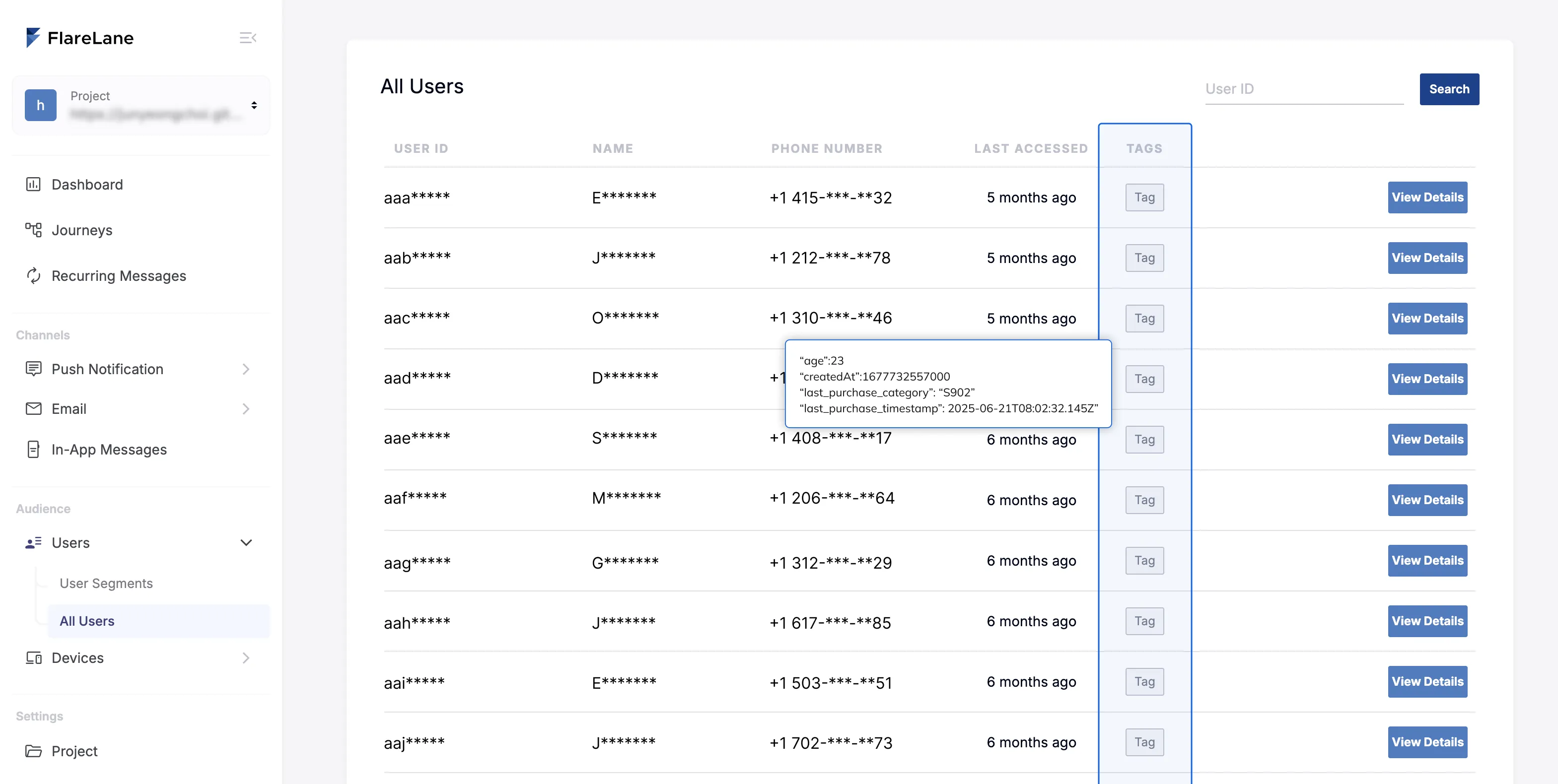
Section titled “Verifying integrated tags”You can review integrated tags in the user or device list.
In the integrated tags list further down the same page, you can review the data available for use. When you integrate a new tag, it is added to the list automatically after a short delay; rather than waiting, you can also add it to the list manually and use it right away. (Being added to the list does not necessarily mean the data has been integrated correctly.)
Use case 1) Creating segment groups
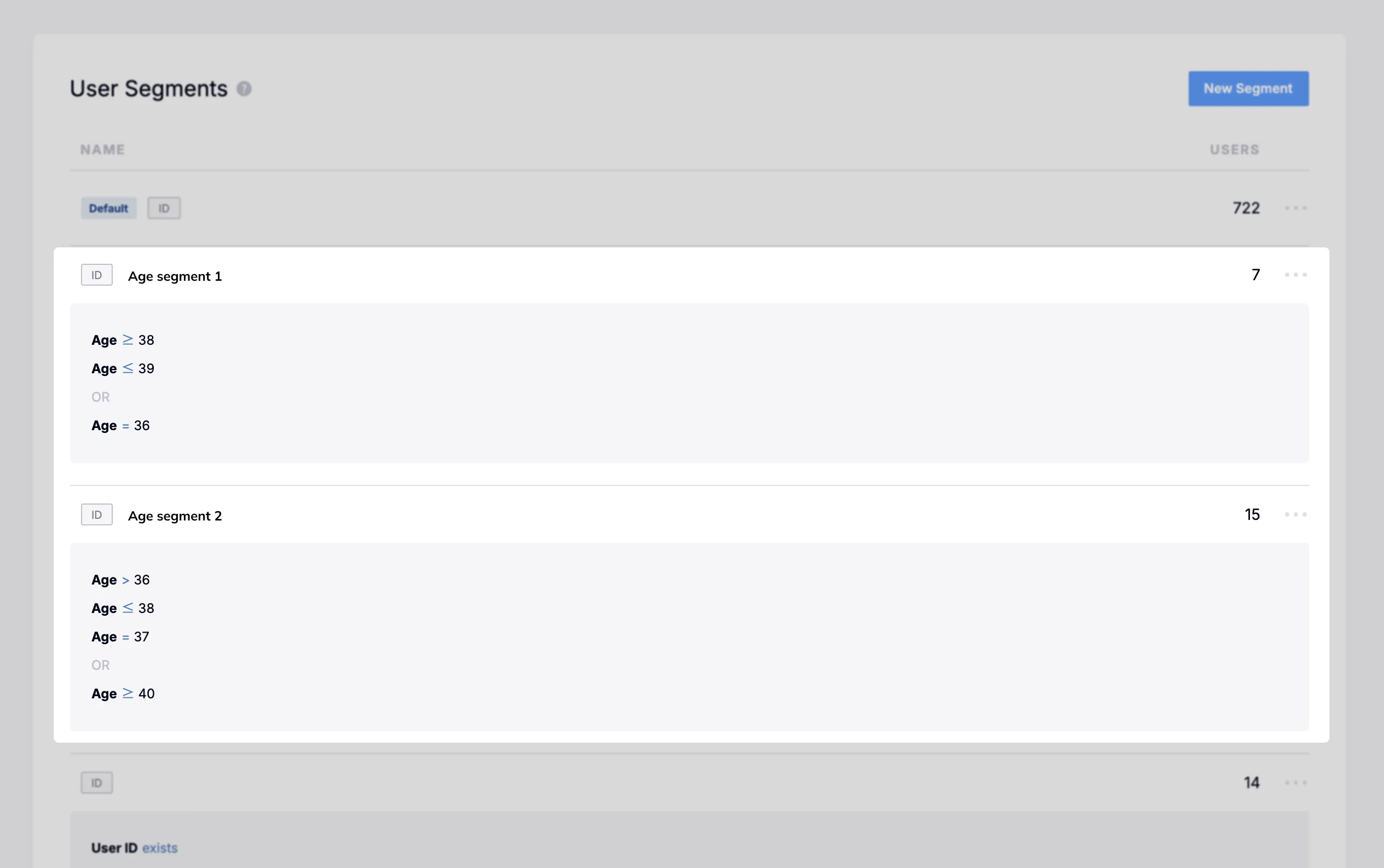
Section titled “Use case 1) Creating segment groups”Using tag filters in segment filters, you can freely build groups of all kinds. You can create conditions using a variety of criteria, such as equals, comparison operators, and existence checks.
Use case 2) Message personalization variables
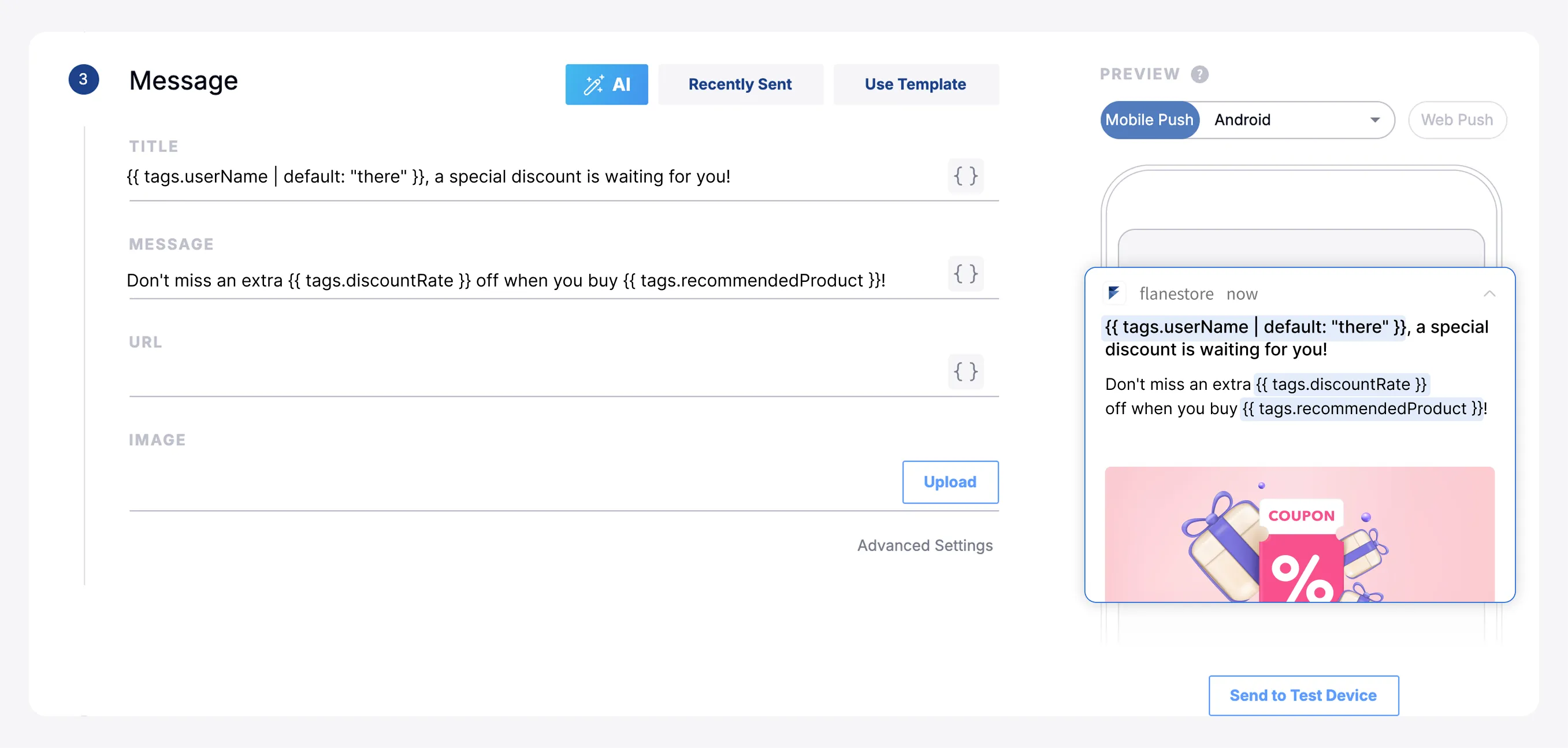
Section titled “Use case 2) Message personalization variables”Integrated tags can be inserted into message content using the personalized message (Liquid) syntax.
Usage: {{ tags.tagName | default: defaultValue }}
Limitations
Section titled “Limitations”- Tag data is subject to a count limit. Dynamically assigning tag names is discouraged because of this limit.
- Arrays of objects will be supported in the future.