'/%3e%3c/svg%3e)

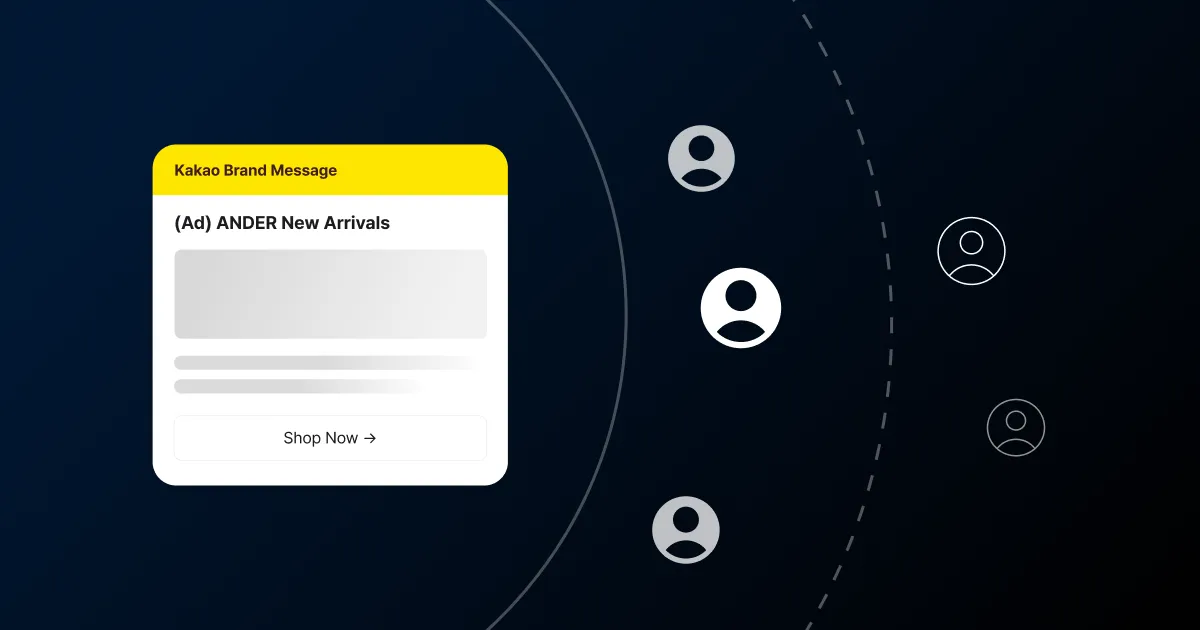
If Alimtalk is the place for informational notices, Brand Message is the channel you reach for when you want to send a promotion over KakaoTalk. Promotional1 messages that push a purchase, like new arrivals or a sale, cannot go out over Alimtalk, so this is where they live.
Friend Talk, the channel many teams ran for years, was reworked into Brand Message, and one thing changed with it. Sending to channel friends stayed exactly as it was. On top of that, a new path opened: you can now reach customers who are not your channel friends.
Alimtalk vs Brand Message
Alimtalk and Brand Message both ride on KakaoTalk, but they do different jobs. Decide which one a message belongs to first, and you hit fewer rejections in review.
| Alimtalk | Brand Message | |
|---|---|---|
| Message type | Informational (orders, shipping, reservations) | Promotional (new arrivals, sales, events) |
| Audience | Anyone with a phone number; no channel friend needed | Friends right away, non-friends after approval |
| Ad label and opt-out | Not required | Ad label and free opt-out required |
| Sending window | No restriction | 8:00 a.m. to 8:50 p.m. KST |
Who you can send to
This is the biggest change in Brand Message. Recipients split into three types by whether they are your channel friend.
| Type | Audience | Sending |
|---|---|---|
| I | Channel friends in your audience | Available immediately |
| N | Non-friends in your audience | Prior approval required |
| M | Your entire audience | Prior approval required |
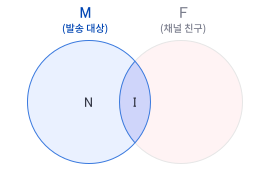
Sending to channel friends (I) works right away, and this is exactly what Friend Talk did. Teams who ran it can carry on as before and decide separately whether to widen to non-friends. To reach non-friends (N, M), you go through an approval step that verifies those customers consented2 to receive advertising. It is not a structure for blasting ads at anyone; it is closer to reaching customers who already opted in, through the familiar window of KakaoTalk.
There are customers you couldn’t reach before because of friend-count limits, even though they had already agreed to receive ads. Now there’s a new path to them. In the FlareLane console you set the audience as a segment built from behavior or attributes, or by uploading a file of phone numbers. The consent data you hold maps straight to your sending audience.
To send to non-friend customers
N and M don’t open the moment you apply. Only approved senders who clear Kakao’s eligibility bar3 can message non-friends. The first gate is channel friend count. Kakao sets it at 50,000 or more, so channels with smaller followings have to clear that first.
Beyond friend count, Kakao also checks business-channel verification, a registered customer-service phone number, and a record of Alimtalk sent successfully in the last three months. The one that matters most is the marketing-consent record, proof of when and how each customer opted in.
That proof is strict about form. Consent collected through a pre-ticked box or vague wording like “benefit alerts” does not count. It has to read clearly as consent to receive promotional information and carry a record of the customer ticking it themselves. Before anything else, check whether the consent data you already hold meets that bar.
You can apply for non-friend eligibility through FlareLane. We review the marketing-consent records and channel status you hold, then help you prepare the N and M sending review. Once you’re approved, you run segment sends and automation from the same console. If you need to reach non-friends, contact FlareLane to get started.
Compliance requirements
Because Brand Message is promotional, Kakao sets sending rules you have to follow. Each message carries an “(Ad)” label and a free opt-out notice. The sending window is fixed too, from 8:00 a.m. to 8:50 p.m. Korea time. Every send assumes the user has consented to receive promotional information, and it has to comply with the Network Act and Kakao’s channel policies. Age-restricted categories, such as alcohol or content harmful to minors, can only go out through an age-verified channel.
Checking each rule by hand on every send is easy to slip on. FlareLane confirms the “(Ad)” label and free opt-out are in place on the messages you send as promotional.
Choosing a message format
Brand Message has a wider range of expression than Alimtalk. You pick a type based on what you want to carry.
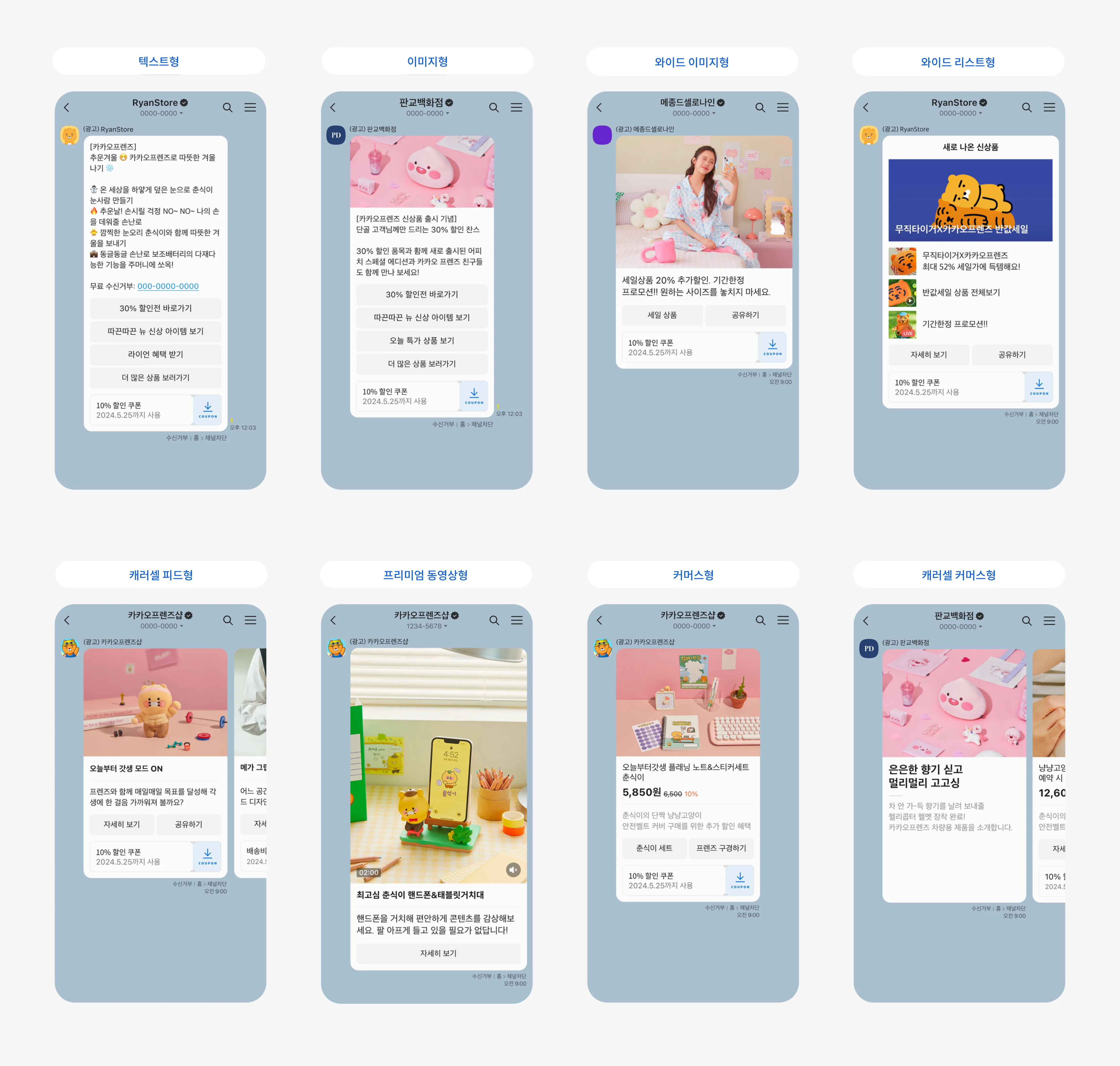
The text-and-image type fits news that needs explaining, with up to 400 characters, one image, and as many as five link buttons. The wide-image type leads with a large single image and short text for visual impact. The wide item-list type lines up three or four product images with brief text, handy when you want to show several products at once. Pick the one that matches the message.
Messages by customer context
A promotional message is no reason to blast once and stop. Personalization variables let you fill in a customer’s name or a product they viewed, so one campaign goes out differently to each person. Sending the same ad to a customer who left items in their cart and one who has been away for a while is simply inefficient.
Attach a goal event and conversion analysis tells you whether the message led to an actual purchase or visit. You are looking at how close it got to revenue, not at send counts. Tie it to customer journey automation and you can design Brand Message to go out at the right moment to customers who took a specific action. Alimtalk announces the transaction, Brand Message invites the next purchase, splitting informational and promotional within the single window of KakaoTalk.
The more you send, the more the per-message rate drives your total cost. FlareLane sends Brand Message at the lowest price in the industry, so widening your reach costs less.
If you already hold data on customers who opted in to ads, a good first move is figuring out which message type to launch with.

'/%3e%3c/svg%3e)